Solved

Invitee limit

  • January 7, 2026
  • 6 replies
  • 41 views

I initially set the  Invitee limit to a group event to 10.

I later on decided to change it to 9 (I needed to save a spot for someone).

It did display 9 in the event itself, but as people kept booking, the emails I got sent still displayed “X of 10”.

Today, the 10th spot was booked without me having changed it back to 10 (thankfully, it was by the person I’d saved it for).

So it seems that if you change the Invitee limit AFTER you’ve created the event, it doesn’t work.

Am I missing something?
Best answer by David

Hi ​@CarolineFF - Thanks for reaching out!

Just to confirm, did you change the event limit from the Event Settings, or the Meetings page?

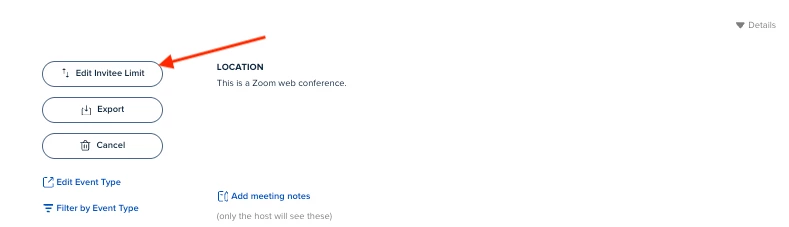
To clarify, event settings are saved for that meeting at the time of booking. So any changes to the event settings won’t effect meetings that have been booked. However, if you’d like to adjust the invitee limit for your group events after they’re booked, you’ll need to go to the meetings page here: https://calendly.com/app/scheduled_events/user/me

Once here, select the event, and you’ll see the button here:
 

Let me know if you have any questions!

6 replies

David
Community Manager
  • Community Manager
  • Answer
  • January 7, 2026

Hi ​@CarolineFF - Thanks for reaching out!

Just to confirm, did you change the event limit from the Event Settings, or the Meetings page?

To clarify, event settings are saved for that meeting at the time of booking. So any changes to the event settings won’t effect meetings that have been booked. However, if you’d like to adjust the invitee limit for your group events after they’re booked, you’ll need to go to the meetings page here: https://calendly.com/app/scheduled_events/user/me

Once here, select the event, and you’ll see the button here:
 

Let me know if you have any questions!


  • Author
  • Community Member
  • January 7, 2026

Thanks David. That explains it then.

Are there any other parameters that shouldn’t be changed through the Edit Event Type (4th item in your image), because they won’t really change there? It seems a bit illogical to me and it is confusing.

I will have to keep this image because I will likely forget this for sure. 😄

Thanks so much and have a great day!


David
Community Manager
  • Community Manager
  • January 7, 2026

Hi ​@CarolineFF - Glad we got it figured out!

So in this case, any changes you make to the event settings will only effect meetings that haven’t been booked yet. So like Duration, Notifications, Invitee Limit; if these are changed through the event settings, they won’t apply to any already booked events

The reason this is done this way is to prevent confusion between invitees. So if something we’re to change like the location, or the description of the event. One invitee might get old information, while another invitee might get the new information. To prevent this, we lock the settings for the specific event at the time of the booking.

If something more drastic would need to change (Like the location) the only way to adjust it would be to reschedule the meeting all together, or just notify the invitees manually.

Just to reiterate, once an event is booked, the settings are saved for that event. However, if you change the event settings, all future booked event will adapt to the new settings, but any times that are already booked will keep the previous information.

I hope this all makes sense! Let me know if you have any questions.


  • Author
  • Community Member
  • January 7, 2026

Just to be clear: This is a group event that happens on a given time and day and to which 10 people max can register and they will all be together at the event with me. (It’s not a type of event where people can book a one-on-one consults with me on any date and time of the month.)

When you say:

“ if you change the event settings, all future booked event will adapt to the new settings”

That did not happen. I changed the event setting to 9 instead of 10 and new people kept being able to book up to 10 as if I did not do that.

Did you mean:

“if you change the event settings OTHER THAN INVITEE LIMIT, all future booked event will adapt.” ?

And “if you change the event using the meeting page instead of the event settings, then all future booked event will adapt.” ?

Also, do the workflows fall under “Notifications”? Can I change those after people have started booking for the event?


David
Community Manager
  • Community Manager
  • January 7, 2026

Apologies, to be clear, I meant all future un-booked meetings will adapt to the new settings.

Right now, the only setting you can change after a meeting is booked is the Invitee Limit.

Workflows also fall under Notifications, so they will not be updated for meetings that are already booked..

Let me know if you have any other questions!


  • Author
  • Community Member
  • January 7, 2026

Ok, thank you.

I now realized that what confused me was the words “booked” and “un-booked”. Booked means “at that particular date and time” and it happens only once despite the fact that other people can keep registering to that same time slot.

Since it’s a group event, I make another event every time I open up that online course, so I saw “Book” as every time a new person books that particular event, but that was wrong.

“Booked” means “at another date/time”.

Sorry for the confusion.

Thank you. That clears it up for me. 👍