


Calendly Notifications: Calendar Invitations vs Email Confirmations
Scenario / Question
I’m setting up event types and see “Communications” in settings. What’s the difference between Calendar Invitations and Email Confirmations, who can use them, and how do I switch between them?
Overview
Calendly can notify invitees using either Calendar Invitations (sent from your connected calendar) or Email Confirmations (sent by Calendly with an .ics attachment). Both options are available on all plans; paid plans add customization and reminders. Some connections and event types force Email Confirmations due to compatibility and privacy rules.
Step-by-Step
-
Open your event type: Go to the specific event type you want to update in Calendly.
-
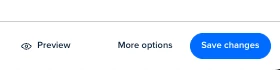
Select More Options at the bottom of the event type editor
-
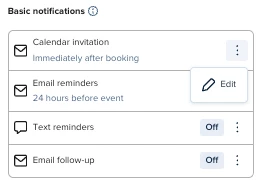
Select Notifications & Workflows, then find the option for Calendar Invitations/Email Confirmations and select the three dots to open the editor:
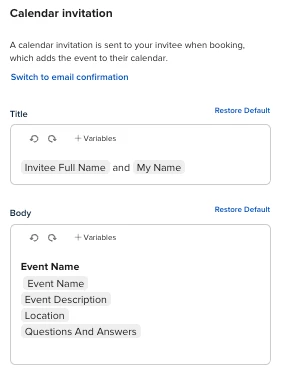
- Here, you’ll be able to switch to/from Calendar Invitations or Email confirmations. This is also where you can edit the content of the emails:
Key Notes & Limitations
-
Calendar Invitations and Email Confirmations are available on all plans; paid plans can personalize confirmations and configure different reminder options.
-
Sender differences:
- Email Confirmations are sent from notifications@calendly.com with your Calendly login email as the reply-to by default; you can opt to use a no-reply address.
- Calendar Invitations are sent from the email set as Add to calendar on your Calendar Sync page (your connected calendar sends the invite).
-
Forced Email Confirmations:
- iCloud Calendar or Outlook Plugin (Windows) as the Add to calendar connection are not compatible with Calendar Invitations; these default to Email Confirmations.
- Group event types cannot use Calendar Invitations for security and privacy; they default to Email Confirmations.
Related Questions (FAQ)
Q: Who can personalize confirmations and set reminder options?
A: Users on paid plans can personalize booking notifications and configure different reminder options.
Q: What address will my invitees see as the sender?
A: For Email Confirmations, messages come from notifications@calendly.com with your login email as reply-to (you can choose a no-reply). For Calendar Invitations, the sender is the email tied to your Add to calendar setting on your Calendar Sync page.
Q: Can I use Calendar Invitations for Group events?
A: No. For security and privacy reasons, Group events default to Email Confirmations.
Q: Can I customize the text inside the calendar event when using Email Confirmations?
A: No. The calendar event content is standardized and not editable when using Email Confirmations.
Q: Can I automate reminders and follow-ups?
A: Yes, with Workflows on paid plans you can automatically send emails or texts before or after bookings to reduce manual work.