


Resolving Microsoft Teams 'Action Required' Error
Scenario / Question
I’m seeing “Action Required” warning for my events using Microsoft Teams as the location.
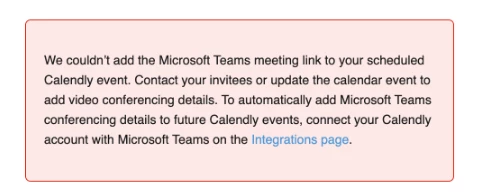
Overview
There are a couple of reasons why this error might appear, some of the more frequent causes are:
- Stale/invalid Teams authorization or integration disconnected
- Microsoft 365 subscription does not include Teams
- Microsoft Teams admin/app permission policies block third‑party apps
Step-by-Step
- Confirm the error: Attempt to connect your Outlook calendar or add a Microsoft Teams conferencing link in Calendly and note any “Admin consent required” or “Needs admin approval” messages.
- Disconnect and Reconnect your Microsoft Teams Integration: You can use this link to navigate there directly https://calendly.com/integrations/microsoft_teams
- If issues persist, check your Microsoft 365 tenant/subscription: Calendly’s Teams integration requires a Microsoft 365 Business or Office 365 Education account.
- If everything at this point checks out, reach out to our support team via chat or the request form at https://calendly.com/help/support.
Key Notes & Limitations
- Admin consent is required if your organization enforces admin approval for app permissions in Entra/Azure AD.
- If the Teams link adds but no calendar event appears, disconnect and reconnect your Outlook calendar from Calendly, then book a fresh test event to validate sync.
- Calendly’s Teams integration requires a Microsoft 365 Business or Office 365 Education account. You can reference Microsoft plan comparisons:
- Exchange Online plans (some do not include Teams): https://www.microsoft.com/en-us/microsoft-365/exchange/compare-microsoft-exchange-online-plans
- Microsoft 365 Business products: https://www.microsoft.com/en-us/microsoft-365/business/compare-all-microsoft-365-business-products