
Question

I keep getting a error when trying to test the API

  • January 16, 2024
  • 8 replies
  • 1378 views

I just signed up for Calendly and am testing it out. There seems to be an issue when I create the Personal Access Token and use it for the API connection. Here is what I am getting returned:


401 Unauthorized


{

"title": "Unauthenticated",

"message": "The access token is invalid"

}


I am trying to test it within the docs, and have also tried testing through Postman, etc. Everywhere is showing the same error. 
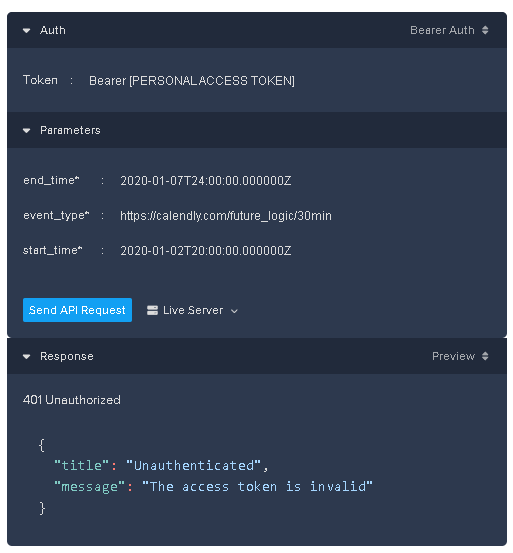
 

For security, I replaced the personal access token. Thank you for your help in advanced.

8 replies

  • Employee
  • January 16, 2024

@Austin33624 can you please try with just your token without the word ‘Bearer’ on the Token parameter? 


  • Employee
  • January 16, 2024

@Austin33624 We currently have two-factor authentication set up for Personal Access Tokens. May I confirm that you went through that process, in generating the token?


  • Author
  • Community Member
  • January 19, 2024

@Austin33624 We currently have two-factor authentication set up for Personal Access Tokens. May I confirm that you went through that process, in generating the token?

I did not could you link an article or instruction of how to do that? It just let me create a key, thank you. 


  • Employee
  • January 19, 2024

Hello! Please do the following…

  1. Sign in at https://calendly.com/integrations/api_webhooks
  2. Click to “Generate New Token”
  3. Name your token, as you wish
  4. Click “Create Token,” and you will see an “Enter code to verify” popup
  5. Check your email for the code (may be in your Spam folder)
  6. Enter the code in the popup (ie, #4 above)
  7. Click “Copy Token” (you should save this somewhere secure because you can only copy the token once)
  8. Use this as the Bearer token in your API call

I am curious to know how you were generating the token earlier.


I hope this helps!


  • Employee
  • January 19, 2024

Also, as @Niraj mentions above, please do try removing “Bearer” when you request the API via the docs.

Further, please be sure to request future dates at the endpoint you are calling.


  • New Community Member
  • October 25, 2024

I am experiencing the exact same issue. The API Key provided after pressing 'Regenerate Key” does not work—with or without the 'Bearer' prefix.

Please help.


  • New Community Member
  • November 4, 2024

I have the same issue. Do you have any workaround?


  • New Community Member
  • November 15, 2024

Problem: I am using OAuth flow for my app and at first I was getting the invalid token error. 

Solution: I changed my app from “sandbox to production” and created a new token after that and add “Bearer prefix” which changed the error from Invalid token to Invalid Argument which was fixed by passing an object to the data instead of string. Make sure to use ngrok etc.

My Code:
 

const webhookData = {

    url: `YOUR_WEBHOOK_ENDPOINT`,

    events: [

        'invitee.created',

        'invitee.canceled',

    ],

    organization: "YOUR_ORGINIZATION",

    user: "YOUR_USER",

    scope: "user",

    signing_key: "YOUR_CALENDLY_SIGNING_KEY",

};

const options = {

    method: 'POST',

    url: 'https://api.calendly.com/webhook_subscriptions',

    headers: {

        'Content-Type': 'application/json',

        Authorization: 'Bearer YOUR_TOKEN'

    },

    data: webhookData

};


axios.request(options).then(function (response) {

    console.log(response.data);

}).catch(function (error) {

    console.error(error.response?.data);

});
