Hello there!
Brand new to using calendly. I have integrated 2 google calendars with my account but the times I have scheduled as “available” in calendly are not blocking those dates/times in my google calendar. How do I change this so I don’t double book something and can easily glance at my google calendar and know my open calendly dates?
Thanks in advance for the help!

Solved
blocking time in google calendar
Best answer by Kelsi
If you’d like to block time in Google Calendar to give yourself a visual of your Calendly availability, all you need to do is make sure those time blocks are marked “free” instead of “busy!” Calendly will view your Google events with this "busy" event status as scheduling conflicts and will automatically remove the time from your scheduling page (including all-day or multi-day events). You can access and change this setting by double-clicking on the event id in your calendar and changing the status from "busy" to "free" as shown below:
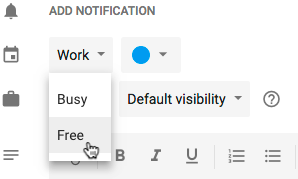
So, I’d suggest creating your time blocks and naming them something like “Calendly Available Hours” and marking them all “free.” Then, when a true Calendly booking comes in, it’ll be placed on your Google Calendar over one of those time slots as a “busy” event. You can then delete the free time slot or leave it there, as it won’t impact anything. I hope this helps!
This topic has been closed for replies.



Sign up
Already have an account? Login
Not a Calendly user yet? Head on over to Calendly.com to get started before logging into the community.
Employee Login Customer LoginLogin to the community
Not a Calendly user yet? Head on over to Calendly.com to get started before logging into the community.
Employee Login Customer LoginEnter your E-mail address. We'll send you an e-mail with instructions to reset your password.