

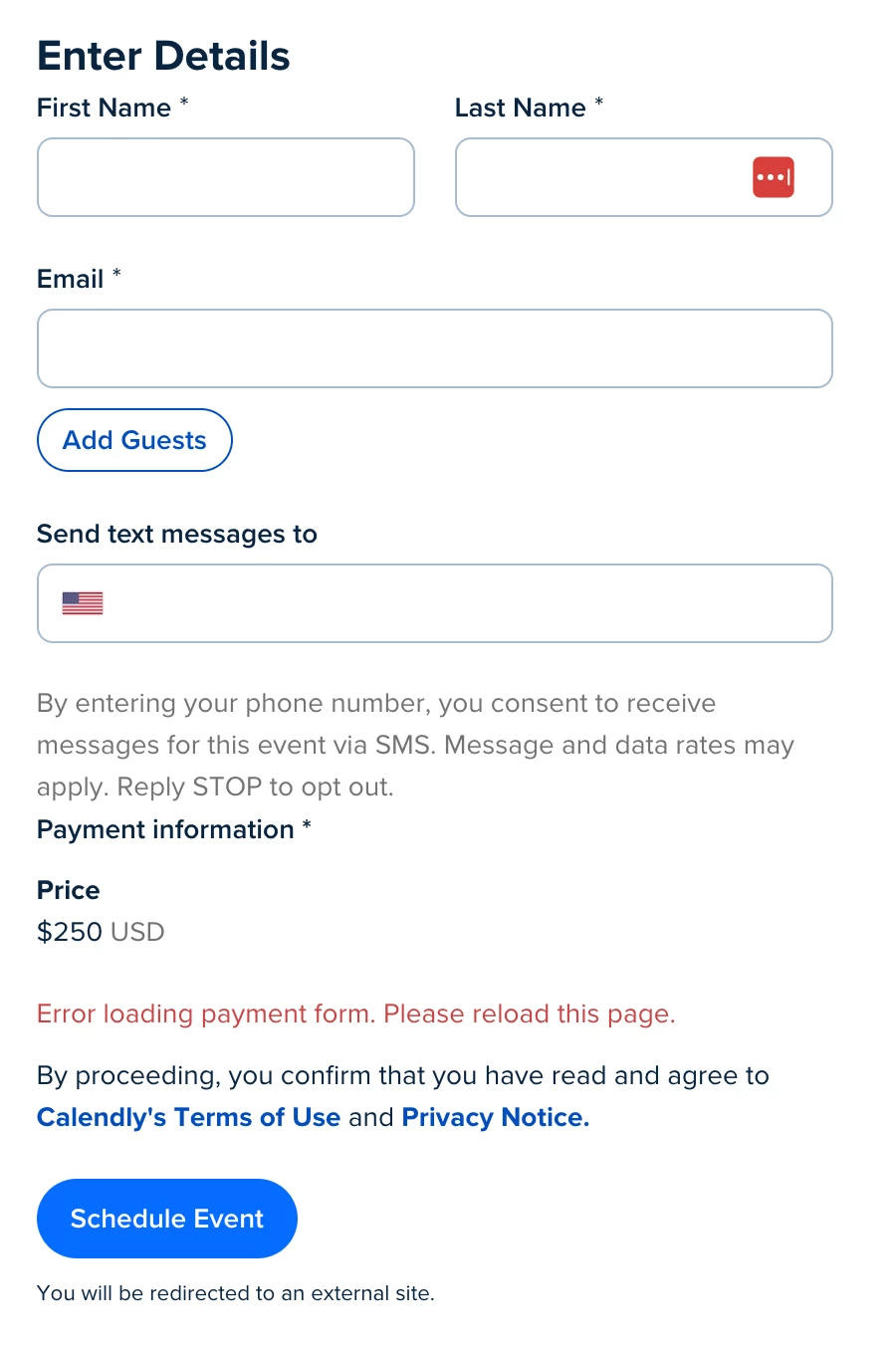
Calendly Booking Page Payment Section Breaking with error "Error loading payment form. Please reload this page."

  • January 16, 2026
  • 30 replies
  • 321 views

jerschneid

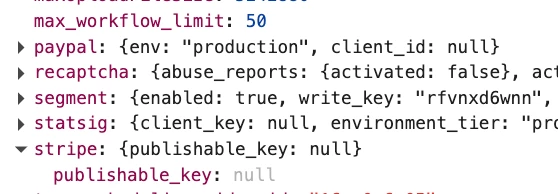
We charge for booking events through Calendly using the Stripe integration. Today, on about half of page loads we’re getting this error where the Stripe payment section should be: "Error loading payment form. Please reload this page."

Mashing reload makes it work about half the time, but some customers keep getting the error, costing us business. Are others experiencing this? Any ideas on how to fix? Screenshot below:


30 replies

  • New Community Member
  • January 16, 2026

I am having the same exact issue and would love if someone can offer any help!


  • New Community Member
  • January 16, 2026

I just fixed my account by following these steps which I found on chatgppt


Check Stripe connection in Calendly (most common)

Go to:
Calendly → Integrations → Stripe

  • Disconnect Stripe

  • Reconnect it

  • Make sure you’re logged into the correct Stripe account (test vs live)

  • Confirm the connection shows as active

👉 If Stripe recently required re-authorization, Calendly may silently fail until you reconnect.


jerschneid
  • Author
  • Community Member
  • January 16, 2026

Hey ​@ErinMalone! I tried disconnecting and reconnecting Stripe as well, but the issue is still happening for me. It’s always been intermittent, so I suspect you may have just gotten some lucky reloads after doing it? If you mash refresh a few more times is it consistently working?


  • New Community Member
  • January 16, 2026


This looks like a frontend error on Calendly’s side not related to the Stripe connection. Their API isn’t returning the stripe / paypal keys.


  • New Community Member
  • January 16, 2026

@jerschneid… I was able to get 2 different payments to go through successfully, but also was running into the same error message, so I do think it is intermittently happening and probably the fix I offered wasn’t actually the issue.  I don’t know who to contact in regard to what the guy above said about it being a frontend error on Calendly’s side, do you?


  • New Community Member
  • January 16, 2026

@ErinMalone - Calendly is likely already looking into the issue, but you can contact [removed by moderator] to let them know it is impacting your account. They’ll be able to provide updates via email.


jerschneid
  • Author
  • Community Member
  • January 16, 2026

I already have an email ticket with Calendly. But my confidence in Calendly is very low. I seem to have a new catastrophic payment issue every couple weeks. 


  • New Community Member
  • January 16, 2026

I have the same issue


  • New Community Member
  • January 16, 2026

I contacted the help desk and they are trying to work on the issue, so they are aware… 


jerschneid
  • Author
  • Community Member
  • January 16, 2026

Calendly should really be including things like this on their status page. Intermittent outages of the BILLING page directly impacts businesses sales. 

https://www.calendlystatus.com/


  • New Community Member
  • January 17, 2026

We are having the same issues, we’ve had two clients reach out saying they can’t book on our website. Hopefully Calendly can get on this asap…


  • New Community Member
  • January 17, 2026

I am having this issue as well. Clients are unable to make a payment through calendly due to the same error message “Error loading payment form”. Multiple reloads does not work.

I tried multiple browsers and only Safari worked. Chrome, Vivaldi, Brave, Firefox, all did not work.


  • New Community Member
  • January 17, 2026

I’m getting the same problem. 


  • New Community Member
  • January 17, 2026

I’ve had multiple people call me saying they can't book. I tested my checkout page on various iPhones, tablets, MacBooks and Microsoft laptop. On one iPhone the checkout page will function after reloading then cease to work again. On other devices it won't work at all even after reloading. I compare my booking page with my stripe portal to see how many potential customers I would have; when the error message is present it isn't possible to see this data.


  • New Community Member
  • January 17, 2026

same issue, tried
reconnecting stripe
multiple browsers
incognito mode
etc
same issue


  • New Community Member
  • January 17, 2026

Same here! 
Not the first time and very frustrating.
Our businesses are losing money and customers by the hour. 
if anyone knows a platform alternative I will be happy to look into it if calendly can’t fix this issue. 


jerschneid
  • Author
  • Community Member
  • January 17, 2026

@Family06773 It’s outrageous that Calendly isn’t even acknowledging this on their status page:

https://www.calendlystatus.com/

It seems we have a production outage every week or two with Calendly. We’ll be looking to switch to Google scheduling ASAP.

https://workspace.google.com/resources/appointment-scheduling/


  • New Community Member
  • January 17, 2026

This is absolutely unacceptable. We should all get together and demand compensation for losses.


  • New Community Member
  • January 17, 2026

This is not acceptable. This demands more than a “sorry” and I’m not talking about a month free of payment. A lot more money could be loss due to this shortage. 


  • New Community Member
  • January 17, 2026

I perform freelance work, running live group training courses for professionals seeking a career change. This morning, this error has cost me $12,375 according to my Stripe transaction log.

Multiple students tried to enroll in my course, but were blocked by Calendly. A few were gracious enough to email me and alert me to the error.

Reconnecting my Stripe account was the first thing I thought to do. The first time, it didn’t work. I had to run my training session this morning and wasn’t able to try again until hours later. I tried it again from a different device to force a manual login to Stripe, which may have worked — I’ll need a student trying to enroll to confirm.

But that’s it, I’ve lost the revenue, and there is no way to recover it. I expect that Calendly will be sending me a check.


  • New Community Member
  • January 17, 2026

Do you think we should explore a class action suit? 


  • New Community Member
  • January 17, 2026

Also, so sorry for your losses. This is awful.. 


  • New Community Member
  • January 17, 2026

Yes.


jillian
Community Manager
  • Community Manager
  • January 18, 2026

Hi everyone. I hear the frustration in this thread and want to be clear that this is not being ignored. We’ve (support + community) escalated the issue further with our engineering team and investigation is ongoing. Because the behavior is intermittent, there isn’t a confirmed fix yet, but we’re continuing to work on it and will update once we have more certainty.


  • New Community Member
  • January 18, 2026

“Not being ignored”… all of our tickets are being ignored. I’ve lost $12,375 so far in revenue for my business. Imagine if that had happened to you… what response from the vendor would you consider “good enough?”


Just checked again after reconnecting Stripe four times and the error is back. Is Calendly going to cut me a check for all the revenue you’ve cost my business?