Question

Change Default Elements in Calendar Invitation Title and Body to preferred defaults.

  • February 3, 2026
  • 2 replies
  • 8 views

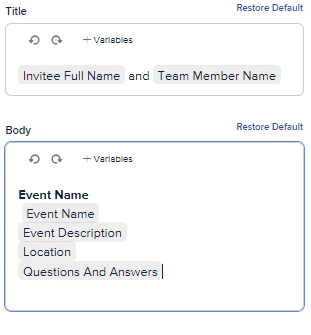
How do we permanently change these options to what our company preference is? Every time we use Calendly we have to change these defaults.  We just want to use Event Name in the title and Event Description in the body but have found nowhere that we can set our internal preferred defaults. 

Is this an option and if so, where does one find it?  Because this does not work for us and requiring this to be changed every time is not good GUI.
 

2 replies

David
Community Manager
  • Community Manager
  • February 3, 2026

Hi ​@CristinaD - Thanks for reaching out!

In this case, I’d recommend duplicating events so that this information carries over. When you create a new event, it will just add all the default information. However, if you duplicate it, it will preload with all the changes you made previously:


Some users I’ve worked with will have a template event that they duplicate and adjust the information from there.

let me know if you have any questions!


David
Community Manager
  • Community Manager
  • February 3, 2026

As an aside, if you’re working with a larger team, you can also use managed events to create a template that can be added to every user automatically

You can read more on this here: https://help.calendly.com/hc/en-us/articles/4409862847511-Managed-Events-overview