Solved

Changing Availability based on meeting type

  • February 6, 2025
  • 2 replies
  • 63 views

Hey all, is there a way that I can have two different settings for availability?  Here is what I am looking for.  I have two different businesses that require different availability hours.  I coach teens at night and I want my evening hours to be just for them.  Day meetings can be open for the adults I meet with.  So if I set up two different 30-min meeting links, could they pull different availabilities?  Thanks for your thoughts.
Best answer by David

Hi ​@Laura86573 - You sure can!

In the event settings, you have the ability to set specific hours for each event separately.So you can have one event for only evenings, and another for mornings! I’ve put together some screenshots of what this looks like:\

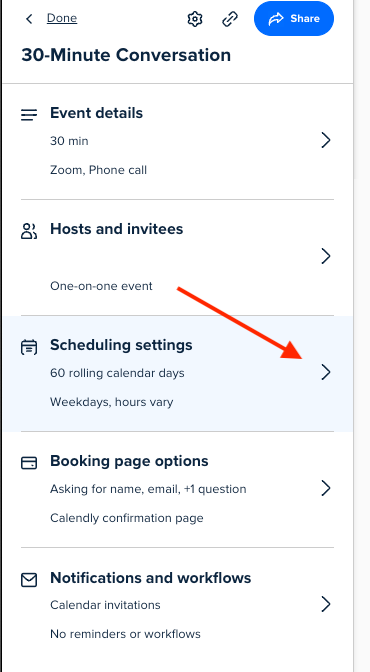
Select the event you’d like to edit, then select Scheduling Settings
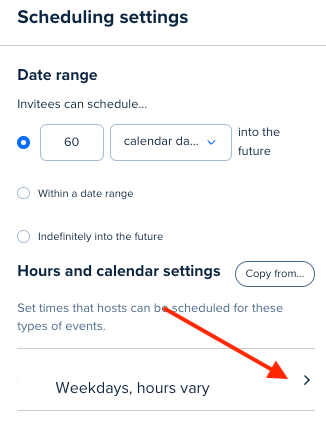
Select your hours under Hours and Calendar Settings
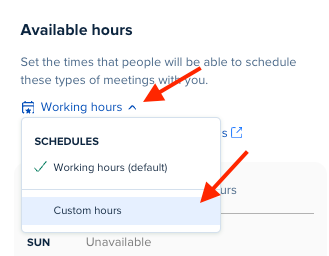
Under Available Hours select Custom Hours


Once all of this is adjusted, you can change the hours for that specific event only!

Let me know if you have any questions.

This topic has been closed for replies.

2 replies

David
Community Manager
  • Community Manager
  • 2014 replies
  • Answer
  • February 7, 2025

Hi ​@Laura86573 - You sure can!

In the event settings, you have the ability to set specific hours for each event separately.So you can have one event for only evenings, and another for mornings! I’ve put together some screenshots of what this looks like:\

Select the event you’d like to edit, then select Scheduling Settings
Select your hours under Hours and Calendar Settings
Under Available Hours select Custom Hours


Once all of this is adjusted, you can change the hours for that specific event only!

Let me know if you have any questions.


  • Author
  • Community Member
  • 1 reply
  • February 7, 2025

Super helpful.  Thanks!