Question

Disable a Single Event on Specific Dates

  • February 27, 2025
  • 3 replies
  • 63 views

There are days when I want to allow one type of event to be scheduled but not another. Example: I want to allow a 30 minute checkin call but not a 60 minute business review. Is there a way to block only the business review events on specific dates?


This topic has been closed for replies.

3 replies

David
Community Manager
  • Community Manager
  • February 27, 2025

Hi ​@Shawn38405 - Thanks for reaching out! 

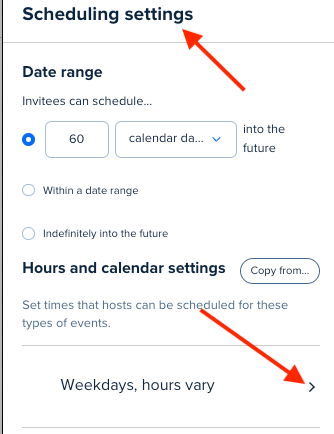
Right now, the only way to do something like this is to adjust the hours under specific events. You can set hours for each event rather than using the schedule by going into the event settings, selecting scheduling settings, then selecting Hours and Calendar settings:


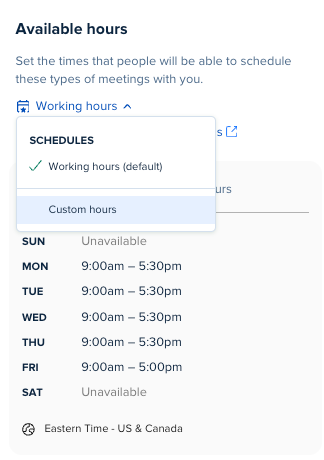
Here, you can change it to use Custom Hours so you can make an event available only on specific days!

Let me know if you have any questions.


  • Author
  • Community Member
  • March 3, 2025

Hi David,

I appreciate your workaround, but unfortunatley, that doesn’t solve for my need. I would like to suggest a future enhancement that would allow for a specific event type to be blocked manually on some days, but allow for other event types to still be booked. Kind regards.


David
Community Manager
  • Community Manager
  • March 3, 2025

Hi ​@Shawn38405 - Thanks for reaching back out.

This is an option that can be changed for specific events, so you can manually block a specific event on some days, while still allowing another event to be booked on that day. You can read more on changing this setting here: Setting date-specific hours


Let me know if you have any questions on this