Question

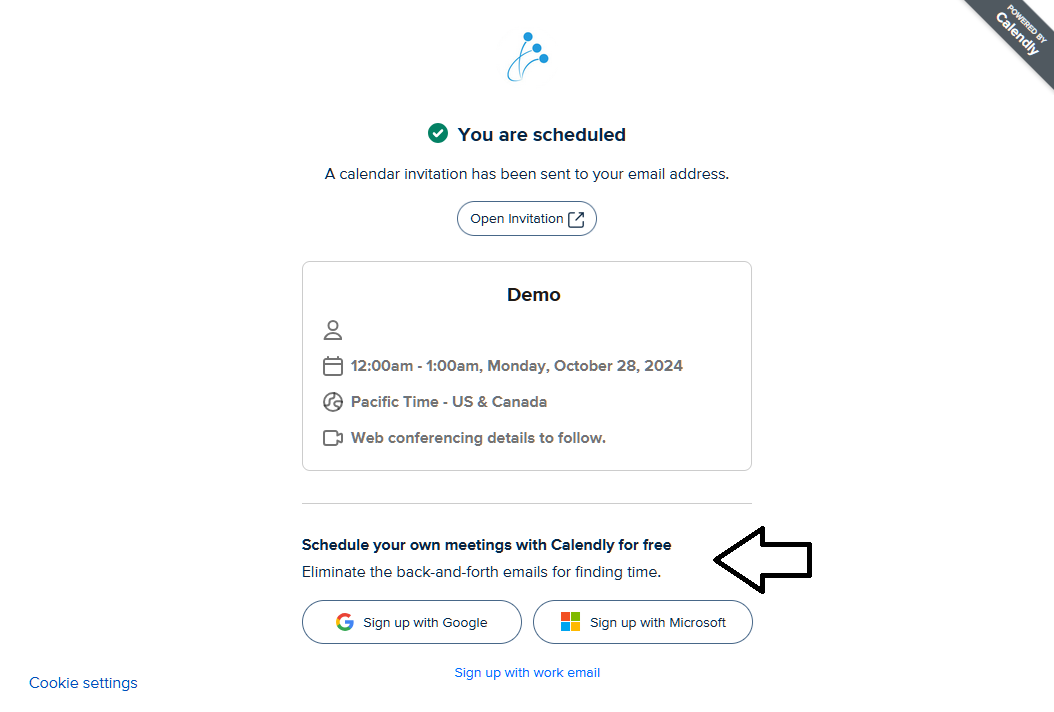
How I can remove 'Schedule your own meetings with Calendly for free' section?

  • October 25, 2024
  • 1 reply
  • 64 views

I already disabled Calendly Branding, but I still see the ‘Schedule your own meetings with Calendly for free’ section on each confirmation page. How can I remove this section? This is a paid account.

 

This topic has been closed for replies.

1 reply

David
Community Manager
  • Community Manager
  • November 1, 2024

Hi @Comparative57301

Thanks for reaching out on this. A Couple things we can check right off the bat:

  • You mentioned it in the post, but wanted to ensure that this is disabled from the Branding Page.
  • After disabling it, you may need to clear the cache and cookies - The banner could still appear due to stored information
  • You can also try looking at this from a different web browser, to see if the issue follows.
     

Could you confirm this and let me know if the issue persists? I did take a look at your booking page from my end, and I don’t seem to be getting the same issue - but let us know!