How can I ensure that if we allow each customer to book 1.5-hour appointments, we maximize the number of bookings during our opening hours? I want customers to start booking right from 10:00 AM instead of 10:30 or 11:00 AM. Sometimes, this difference results in losing up to two bookings per day, which is a waste of revenue.

Solved
Maximize number of bookings per day
Best answer by David
Hi
Under your Scheduling Settings of the event, you’ll want to adjust the Start Time Increments option here:
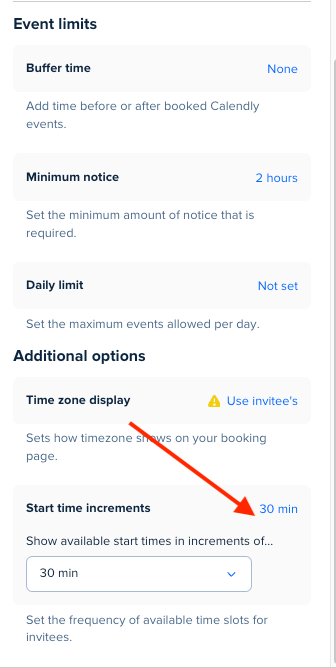
So instead of showing times every 30 minutes, you can change it to be every 90. This way you can fit all the bookings you want, without worrying someone would book right in the middle and mess up the times for the rest of the day.
Let me know if you have any questions!
This topic has been closed for replies.



Sign up
Already have an account? Login
Not a Calendly user yet? Head on over to Calendly.com to get started before logging into the community.
Employee Login Customer LoginLogin to the community
Not a Calendly user yet? Head on over to Calendly.com to get started before logging into the community.
Employee Login Customer LoginEnter your E-mail address. We'll send you an e-mail with instructions to reset your password.