Solved

Office 365 Integration - Access requirements

  • March 18, 2025
  • 3 replies
  • 435 views

Does Calendly still require full access to Office 365 - Outlook Calendar? Meaning Calendly can read the actual event data on your calendar instead of just checking your availability?



Best answer by David

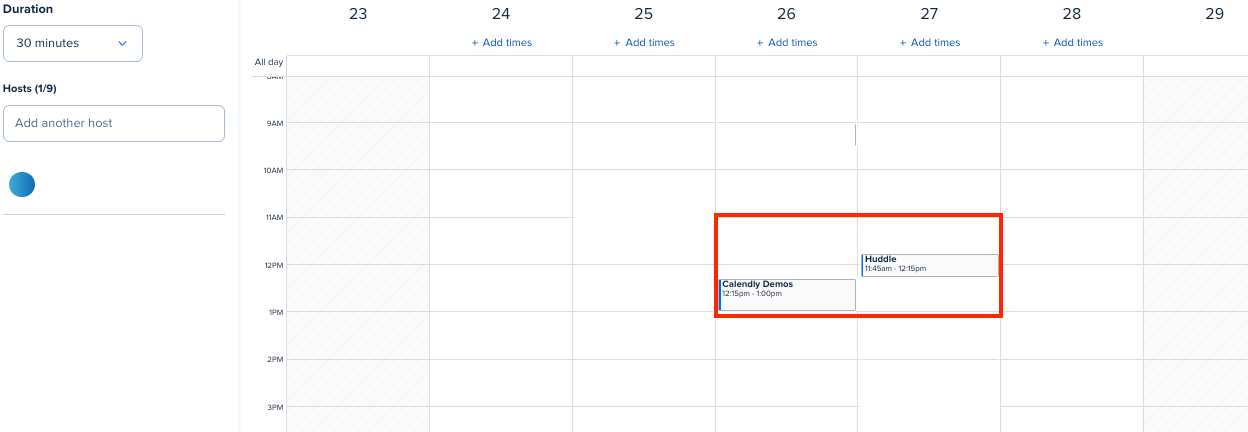
Yes as this is part of the scope that is required for Calendly to write events to your calendar, however this is only used to display events inside of Calendly like so:


For more information, you can reference this document here that goes over the scope of Calendly<>Office365.

This topic has been closed for replies.

3 replies

David
Community Manager
  • Community Manager
  • March 18, 2025

Hi ​@Mark83776 , thanks for reaching out!

Calendly is built to only access the minimum data needed from connected calendars to deliver its service. In most instances, our Office365 integration only use and display the duration and free/busy status of the events in your calendar so that we don’t book you when you’re busy. A few of our features also use and display the meeting titles in your calendar. We will need full access to be able to read, update, create and delete events in your calendars as people schedule with your Calendly links.

If you reach out to our support team, they’ll be able to supply more documentation on this for more info. You can email them here: support@calendly.com


Let me know if you have any questions.


  • Author
  • Community Member
  • March 18, 2025

So Calendly can see who I am meeting with, ,meeting details and event titles / subjects?


David
Community Manager
  • Community Manager
  • Answer
  • March 18, 2025

Yes as this is part of the scope that is required for Calendly to write events to your calendar, however this is only used to display events inside of Calendly like so:


For more information, you can reference this document here that goes over the scope of Calendly<>Office365.