Question

Removing Time & Location block from the calender?

  • November 11, 2024
  • 3 replies
  • 127 views

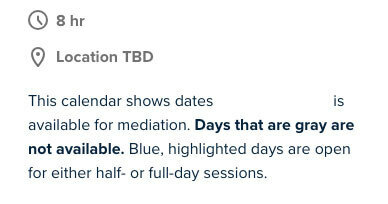
Is there a way to remove these two items.  My client only wants his customers to see the days he’s available and request days for meeting.  This is a law firm that does arbitration, so there’s now way to know how long each meeting will take.  Basically, he wants them to request a day that’s available on his calendar and his staff will work out how much time is needed.  I have it set for 8hr blocks, but we don’t want that to show.  Attaching an example:
 

This topic has been closed for replies.

3 replies

  • New Community Member
  • November 11, 2024

My question is almost Identical. My client wants to present their customers with the choice of a morning call back or an afternoon call back.


  • Author
  • Community Member
  • November 11, 2024

For me, it would be fantastic if we could insert CSS with the widget that would allow for customization and styling any element within the widget.


David
Community Manager
  • Community Manager
  • November 12, 2024

Hey all!

Thank you both for reaching out on this. I did some digging on my end to see if there is anything we can try here.

The one thing I did find, is that if you embed the booking page to the website, you can set it to hide event details, so the embed will look something like this:


However, the issue you’ll run into is that the event details will still be displayed when they go to enter their information like so:


Unfortunately, there is not a way to hide this view from the user thats using the booking page at this time. However, I do think this would be a great benefit for users with similar cases, so I’ve gone ahead and sent this over to our product team to raise some additional support for a more customized view. Please let me know if you have any questions - Or if anyone else has any unique workarounds, we’ll be happy to hear it!