Solved

Routing form fields misaligned and support is down

  • April 3, 2024
  • 5 replies
  • 136 views

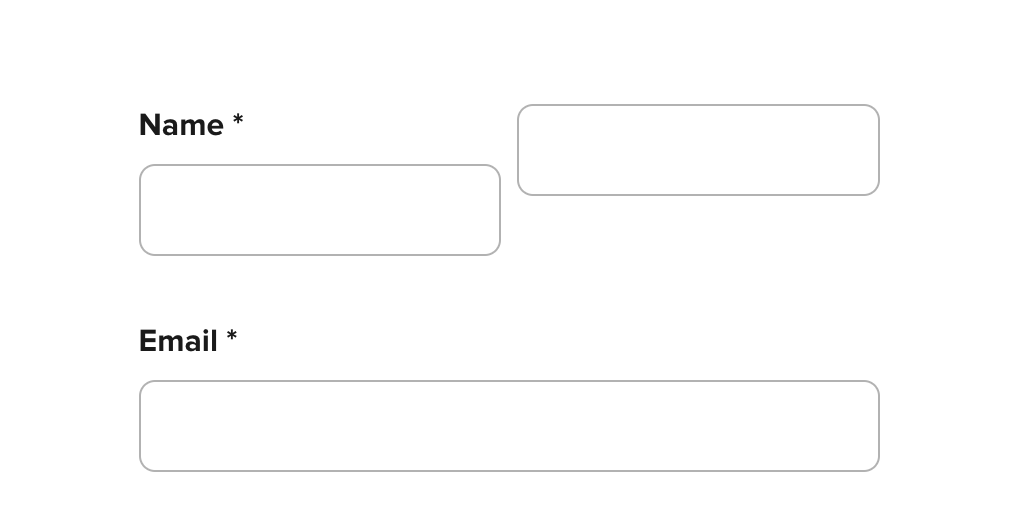
We noticed that our routing forms suddenly have the last name field higher than the first.  This is on multiple computers and browsers and happens even when just previewing the form before sharing.   Support isn’t working and won’t connect soooooo any thoughts here?


Best answer by Kelsi

Hey there @Brandon11454 and @Brian46051 - great news! Our live chat support is back up and running. Please feel free to try reaching out again to our fabulous support team any time. =) 

As far as the routing forms issue goes, here’s what you can do right now to fix it: 

  • Head to your Routing Forms page > click on the form to “edit” the name field

  • Enter any names at all as placeholders > “save” (for example, "First name" and "Last name" - type those in the text fields > “save”

  • This should resolve the issue! 

Let us know if that works - it’s been working for other users with this problem. 🤗

This topic has been closed for replies.

5 replies

  • New Community Member
  • April 3, 2024

I’m having the same issue. Calendy support is down has become a headache especially during a busy work day. Cant get a hold of anyone at the moment


Kelsi
  • CalPal Emeritus
  • April 3, 2024

Hello @Brandon11454 and @Brian46051! Thank you so much for posting and we are so sorry for the issues you are both encountering.

At this very moment, there happens to be an outage of our support team’s live chat function and an issue with our routing forms. Both are being worked on diligently by the respective teams involved to fix them as quickly as possible! 

I will come back to this post to update you both as soon as we have word on either/or our live chat support (or hopefully) and our routing forms being back to their intended functionality. 

We truly appreciate your patience while our team works hard to resolve this for you - and again - we will update you ASAP! 


Kelsi
  • CalPal Emeritus
  • Answer
  • April 3, 2024

Hey there @Brandon11454 and @Brian46051 - great news! Our live chat support is back up and running. Please feel free to try reaching out again to our fabulous support team any time. =) 

As far as the routing forms issue goes, here’s what you can do right now to fix it: 

  • Head to your Routing Forms page > click on the form to “edit” the name field

  • Enter any names at all as placeholders > “save” (for example, "First name" and "Last name" - type those in the text fields > “save”

  • This should resolve the issue! 

Let us know if that works - it’s been working for other users with this problem. 🤗


  • Author
  • Community Member
  • April 3, 2024

Thanks, that worked.


Kelsi
  • CalPal Emeritus
  • April 3, 2024

Thanks, that worked.

So glad to hear this! =)