Solved

It won't let me turn off my current Event Type
  • January 19, 2026
  • 9 replies
  • 97 views

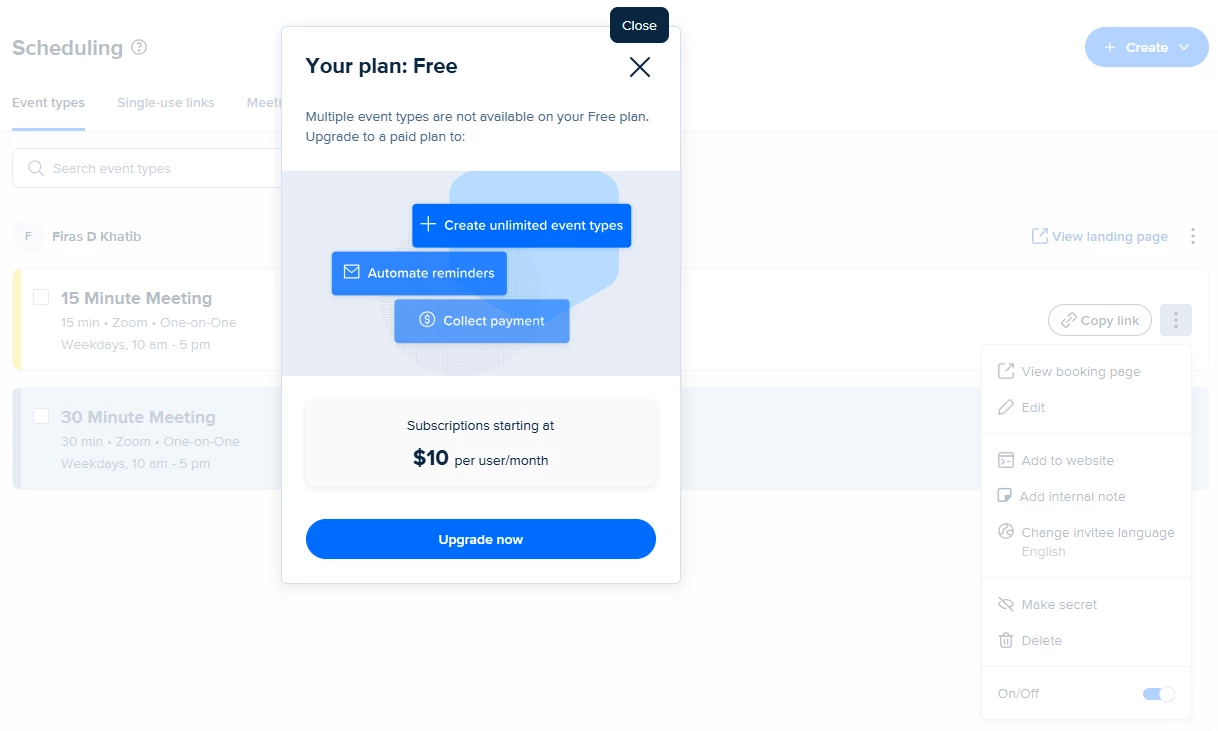
As soon as I click on the On/Off toggle button, it brings me this pop-up.


The chatbot couldn’t understand the issue, and I don’t know why this is suddenly happening… as I was able to switch easily from 15-min to 30-min previously.


Best answer by David

HI all - Thanks for your patience.

I was able to confirm that this is part of the new policy that is rolling out to Free accounts. In the future, you will not be able to switch between different events on the free plan, you will need to make adjustments to your current event in order to book different times.

I’m more than happy to pass along any feedback you have to the product team, I’ll leave this thread open for future responses. :)

9 replies

David
Community Manager
  • Community Manager
  • January 20, 2026

Hi ​@Firas20272 - Thanks for reaching out! Happy to clarify whats going on here.

Because you’re on our free plan, this limit is set at only one event type, so you cannot have more than one event created in your account at one time. This also includes switching between multiple different events like you’re seeing here. So the only workarounds from here are:

  1. You can adjust the settings in your events
  2. You can upgrade to the Standard Plan ($10/Month) to allow you to switch between multiple events easily, and it includes some great additional features.
     

Let me know if you have any questions!


  • Author
  • Community Member
  • January 20, 2026

So this is a new policy?

I always had 15-minute, 30-minute, and 60-minute events… but was never allowed to have them both on at the same time.

Now I can’t switch between them and the only option is to delete one and just modify the timing on it?

:-(


  • New Community Member
  • January 21, 2026

Firas20272, i’m running into the exact same issue. and i see your comment was left 9 hours ago.. so it appears as though they changed policies, because your right, last week i was able to toggle between them and now it’s just the annoying pop up 🙃🙃 they are really wanting our $10 lol


  • New Community Member
  • January 21, 2026

@Firas20272 ​@laila1234 - I think this might be a bug rather than a policy change; I’m still able to switch between event types on the free version. When I disable my one active event type I don't see this pop up (it only appears if i try to enable a second event type).

Have you tried disabling the event type from the mobile app? I’m wondering if that could be a workaround to switch event types until the desktop version is working again.


  • Author
  • Community Member
  • January 21, 2026

Thanks... my first reaction was that this must be a bug, so hopefully that’s the case.


 I have never downloaded the mobile app, but I’m pretty surprised that nobody else has reported this.


David
Community Manager
  • Community Manager
  • Answer
  • January 21, 2026

HI all - Thanks for your patience.

I was able to confirm that this is part of the new policy that is rolling out to Free accounts. In the future, you will not be able to switch between different events on the free plan, you will need to make adjustments to your current event in order to book different times.

I’m more than happy to pass along any feedback you have to the product team, I’ll leave this thread open for future responses. :)


  • Author
  • Community Member
  • January 21, 2026

Thank you for the confirmation, David.

That is indeed unfortunate, and I suspect that you will have more feedback from free users as they run into this “feature”.

My feedback to the product team would just be that they are only making it more difficult for users to do what they were able to do previously. A free user who only casually uses Calendly will never pay the same as Netflix per month for such a feature. Taking away that easy way to switch between events will not gain you $10/month… it’ll more likely drive free users to other services.


  • New Community Member
  • February 4, 2026

I encounter the same issue. i am unable to toggle off past event and was redirected to the Upgrade Plan pop up. They really trying to get the $10 but then again I use this occasionally like once every few months. So the plan don’t make sense. Is this issue a bug or what ? Are the dev fixing it. 


  • New Community Member
  • February 4, 2026

@HB_sales - according to David this is not a bug; as a workaround, it looks like you can use the API to switch active event types but I would assume this will be patched at some point.