Question

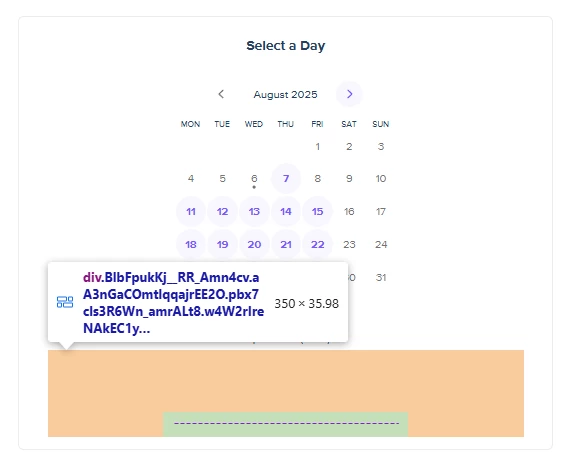
Setting hide_gdpr_banner=1 doesn't remove wrapper div

  • August 6, 2025
  • 1 reply
  • 100 views

I would like to hide `Cookie settings` by adding `hide_gdpr_banner=1` parameter. When I apply it the button is indeed hidden, but the wrapper element is NOT, so that there is a lot of empty space under the calendar. Is it possible to fix it or handle it somehow?
 

1 reply

Hi Nazar!
 

My name is Taylor, and I'm a Developer Support Specialist with Calendly.


hide_gdpr_banner=1 is supported for embedded Calendly pages and is intended to hide the cookie banner/button itself.


If the button is hidden but you still see empty space underneath the calendar, the best workaround is to adjust the embed container’s height on your site. Our embed guidance recommends manually tuning the embed’s width/height until it fits the page correctly.
 

For example, if you’re using an inline embed, try slightly lowering the height value in the embed code or with your site CSS until that extra space is removed. This may look something like this:

<div
  class="calendly-inline-widget"
  data-url="https://calendly.com/YOUR_LINK?hide_gdpr_banner=1"
  style="min-width:320px;height:590px;">
</div>
<script src="https://assets.calendly.com/assets/external/widget.js"></script>
 

Also, if you hide the cookie banner, make sure your site is handling cookie consent separately, since Calendly still uses cookies even when the banner is hidden.


Hope this information was helpful! If you have any other questions please let me know!