


Customizing Booked Event Titles to Show Invitee Names in Calendly
Scenario / Question
How do I change how a booked event appears on my connected calendar so it shows the invitee’s name instead of the generic event name?
Overview
You can control how a booking appears on your connected calendar by editing the event type’s calendar invitation title or email confirmation subject to include variables like the invitee’s name. This customization requires a paid plan (Standard or higher).
Step-by-Step
- Open the event type you want to change: Go to the event type where bookings are not showing the invitee’s name on your calendar.
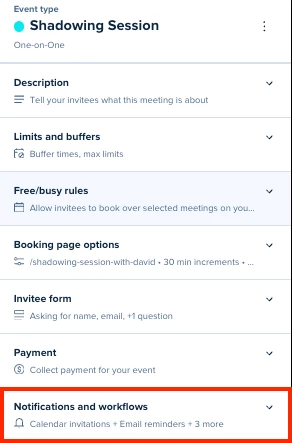
- Select More Options, then select Notifications and Workflows:
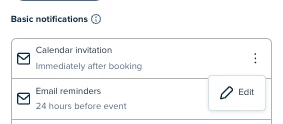
- Edit the calendar invite title or email confirmation subject: In the event type’s settings, find the text field for the calendar invitation title or the email confirmation subject and customize it.
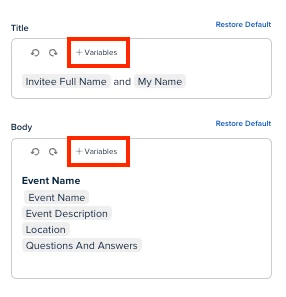
- Insert the invitee name variable: Add the invitee name variable (for example {{Invitee_full_name}} depending on the variable syntax shown in your editor) to ensure your connected calendar shows the person’s name in the event title.
- Save and test: Save your changes, book a test event for that event type, and confirm the new title appears correctly on your connected calendar.
Key Notes & Limitations
- Customizing invitation titles and confirmation subjects requires a paid plan (Standard or higher).
- The way events display on your external calendar is determined by the title/subject text you configure in the event type settings, not by the event type name itself.
- If one event type shows the invitee’s name and another does not, it likely means the invitee name variable is present in one event type’s title/subject but missing in the other.
Related Questions (FAQ)
Q: Why does one event type show the invitee’s name while another shows only the event name?
A: The invitee name variable is probably included in the title/subject of one event type but not the other. Edit the event type that’s missing the name and add the invitee name variable to its title/subject field.
Q: Do I need a paid plan to change how events display on my connected calendar?
A: Yes. Editing calendar invitation titles and email confirmation subjects is available on paid plans (Standard or higher).
Links & Resources