


Limiting Invitee Booking Availability to the Next Two Months
Scenario / Question
How can I limit my availability so invitees can only book with me within the next two months, instead of far into the future?
Overview
You can restrict how far in advance people can book by setting a date range on each event type. In Scheduling settings, choose a specific number of days into the future (for example, 60 days) or set an explicit date range window. This prevents invitees from scheduling 5 months out.
Step-by-Step
- Open your event type: Go to Scheduling and select the event type you want to edit.
- Go to Availability: In the event type, use the dropdown for Availability:
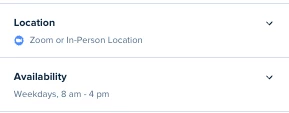
- Open the date range: Under Date-range, open the range dropdown (for example, "60 days").
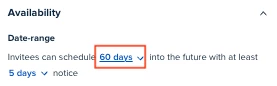
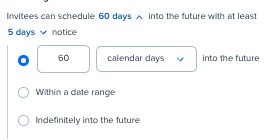
- Choose your window: Pick one of the three options:
- Number of days into the future — set how far ahead invitees can book. For a 2-month window, set 60 days.
- Within a date range — pick a specific time window for booking.
- Indefinitely into the future — allow invitees to book anytime.
- Choose day type if needed: If you selected a number of days, choose whether the count uses calendar days or week days.
- Save your changes: Select Save changes. Your booking page will now only display times within the window you set.
Key Notes & Limitations
- The date range is configured per event type; update each event type you want to limit.
- You can choose either a rolling window (X days into the future) or a fixed from/to date range.
- You can count the window using calendar days or week days.
- Minimum scheduling notice is set in the same Date-range area if you also want to prevent last-minute bookings.
Related Questions (FAQ)
Q: Can I set different booking windows for different event types?
A: Yes. Adjust the date range within each event type’s Scheduling settings.
Q: Can I stop bookings beyond a specific end date (for example, for a seasonal program)?
A: Yes. Use a fixed date range (from X date to X date) in the Date range section.