

hilaryyeg
Employee
Employee
May 8, 2026
Sticky

A quick intro to Calendly Contacts — including new features: lists and custom fields

  • May 8, 2026
  • 9 replies
  • 1067 views

If you haven’t spent much time exploring Calendly lately, you may not have discovered Calendly Contacts — here’s a quick intro!

Calendly Contacts is a simple way to keep your relationship details, meeting history, and follow-ups in one place.

If you’re tired of hunting through email threads for context, updating spreadsheets or other tools manually, or trying to remember who to follow up with (and when), Contacts can help.


How it works

Every time someone books time with you via Calendly, a new contact profile is created with their name, email, and phone number (if available). You can also manually add contacts or import contacts from a CSV (rolling out now).

The best part: contact profiles grow over time. As you meet and interact, Contacts builds an up-to-date view of every relationship — including contact details, meeting history (plus Notetaker recaps if you have access), and upcoming meetings.

You can even book a new meeting or share your availability via email right from a contact’s profile.

We also just rolled out two new features that make Contacts even more useful: custom fields and lists.


New: Custom fields (track what matters to your business)

Not everyone tracks relationships the same way. Custom fields let you add the details you care about beyond standard contact info (like name, email, and phone number) directly to the contact table.
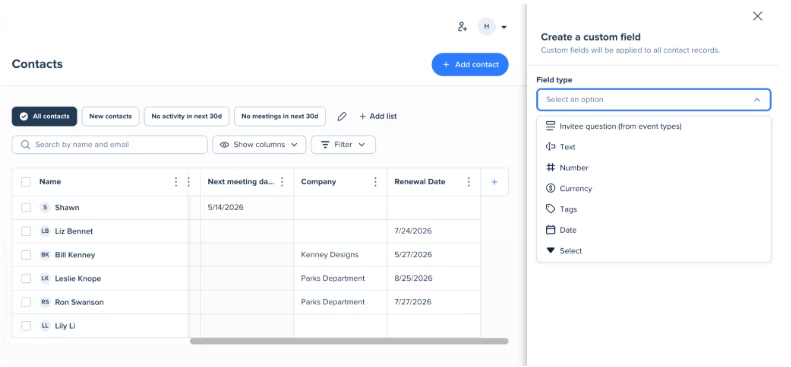
 

You can create custom fields based on:

  • Invitee question (answers from booking form questions)
  • Text
  • Number
  • Currency
  • Tag
  • Date
  • Multi-select

Use them to track things like renewal dates, project status, budget/currency, VIP tier, birthdays, lead source, and more.

Once those details are captured, you can filter and sort your contacts table based on custom fields, which leads me to the next new feature.


New: Lists (know who needs your attention)

Lists help you stay organized as your contacts grow. Use built-in lists to quickly spot who’s new or who you haven’t met in a while, or create your own. 
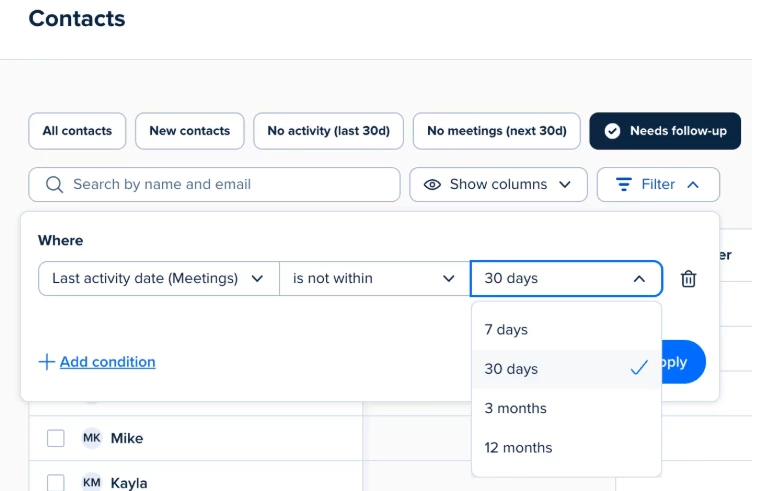
 

For example, you can create and save lists that help you answer: 

  • Who do I need to follow up with based on our last interaction?
  • Who have I not met with yet this year?
  • Who’s in a city I’ll be traveling to soon?

And you can use custom fields to build lists around the details you track, like a VIP list or renewals coming up next month.

Once you have a list, it’s easy to turn it into action: follow up by email, book time, or plan a dedicated outreach.


Get started

If you’re not sure where to begin, try creating a custom field, filling it in for a handful or contacts, then save one list you’ll check weekly.


Questions or feedback? Let us know in the comments!

    9 replies

    New Community Member
    May 25, 2026

    I do research for more than one group of interest. What way do I separate these?

    hilaryyeg
    Employee
    hilaryyegAuthor
    Employee
    May 28, 2026

    Hi ​@Harriet32032, we may need more details to best answer your question. However off the bat, I think you could definitely create a custom field for each ‘group’ and then use lists to filter by those custom fields (and save the lists for easy access). 

    In this example, I created a custom field with the field type ‘tag’ and named it Group. Then under each contact, I added new or chose existing tags “Group A” or “Group B”


    Then I created a list using conditions where custom fields (Group) = either Group A or Group B.


    and that gives me a quick view of everyone in that group of interest.


    Hope this is helpful!

    Hilary - Product and Partner Marketing @ Calendly
    New Community Member
    June 18, 2026

    Calendly Contacts is becoming more powerful with the addition of Lists and Custom Fields. These features help users organize contacts, segment audiences, and capture important details for personalized scheduling and follow-ups. A great update for improving workflow efficiency, contact management, and customer engagement.

    New Community Member
    August 20, 2026

    When using the import CSV function, one of my custom fields is not populating. The field is set correctly for the data type (text) and data is being mapped correctly but the data does not show up after import. I’m wondering if there is a character maximum for the text-type custom field? Or is it not able to import data with certain characters (in this case, a comma)?

    hilaryyeg
    Employee
    hilaryyegAuthor
    Employee
    August 20, 2026

    Hi ​@Mike11571 , sorry for the difficulties! I checked with our team on this and they suspect per your comment that it’s likely due to the commas. They said: 


    If they have commas in strings that are not properly escaped, then the file will be misread since commas are the delimiter in a CSV file.


    Ex:

    Email,Notes

    alex@example.com,"Interested in pricing, asks for a follow-up"


    Will parse Notes correctly as

    Interested in pricing, asks for a follow-up


    Whereas

    Email,Notes alex@example.com,Interested in pricing, asks for a follow-up

    Will parse Notes as

    Interested in pricing


    and everything after the last comma will be treated as an unexpected extra column for that row.


    and recommend ensuring there are no unescaped text strings containing commas. Hopefully this is helpful but let us know if not, and we can figure out how to address in the guidance.

    Hilary - Product and Partner Marketing @ Calendly
    New Community Member
    August 20, 2026

    I’ve confirmed the fields are properly escaped. The data will import if I map it to a “tag” custom field type (the commas don’t import), but not a “text” custom field type. 

    New Community Member
    September 15, 2026

    Really useful update. I especially like the idea of custom fields combined with lists — being able to track things like renewal dates or lead status and then turn that into a list for follow-ups could save a lot of manual work. I’ll definitely have to spend some time exploring Contacts and see how it fits into my workflow.

    New Community Member
    September 16, 2026

    NICE