David
Community Manager
Community Manager
November 27, 2024

Overlapping Meetings

  • November 27, 2024
  • 19 replies
  • 3560 views
Overlapping Meetings

Hey Community! 👋
 

Have you ever wanted to host two meetings at the same time? Or maybe you have multiple services that can be offered in the same time frame. With this new feature, this is now available for you to use! Lets take a look to see how you can use our new book over meetings feature!
 

Who is this for?

Any user on any of our plans can utilize this!


Before we can use this feature, you will need to make sure you have a Calendar connected and being checked for conflicts, you can see if you have one connected over on your Calendar Sync page

❗If your calendar is not set to be checked for conflicts, this feature will not work


Where is this configured?
To find this, you can follow the instructions below!
 

Edit your event and select More Options
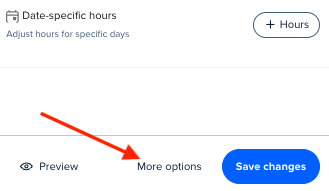
AD_4nXflnDvkmLt_LrgJUZWA2Qu2gOr35N3WKSJ9tBzwm4wG7gBDyt4UJRPkd1bRCNODneNZYFWLuhFstvoXoO0hikGzWgwuZ_UresMyFQgX6JGNJdlaY1RFS9hZj2a7jO--D_vcHfxx?key=FLlqK7tJq2iJ177AKoa7YSoa

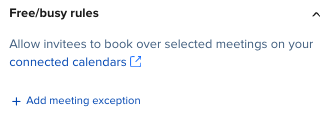
Select the Free/Busy rules dropdown
 

AD_4nXeKUO0Lf81uBamTX6iY8iYCbUdzi97A4e9-acuc1GeDvN1E-qO4kshHoW-PcCDWvXHqWJuaS2ql7hOGTKK9T5kw0cAk6tYb8rVbMbj4edes9AKiSiudy6PDF5U1DjAQbYuoaCX5-A?key=FLlqK7tJq2iJ177AKoa7YSoa


Now that we found it, what options do we have to configure it?

First, select (+ Add meeting exception)
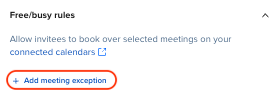
AD_4nXeMfumhPuZSvCsnpZaLCLZ7pqZhmXdq4XQQUEhfRScfF-yM4z8frIqmVx2cd1XhpaPh9SmBgNMNJGQvOsBPk8845RLPSUmv50DMu0W-7dO7zNogjV_ytgHytx0SRZeYHzq88zxGGw?key=FLlqK7tJq2iJ177AKoa7YSoa

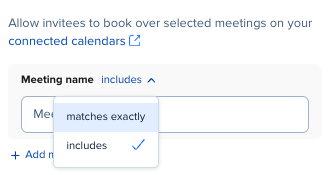
  • Using the dropdown menu, select one of the following options: 
    • Includes
      • This option will search your connected calendar for all event titles that include what you type in the search bar.
    • Matches exactly
      • This option will search your connected calendar for event titles that exactly match what you type in the search bar.
         
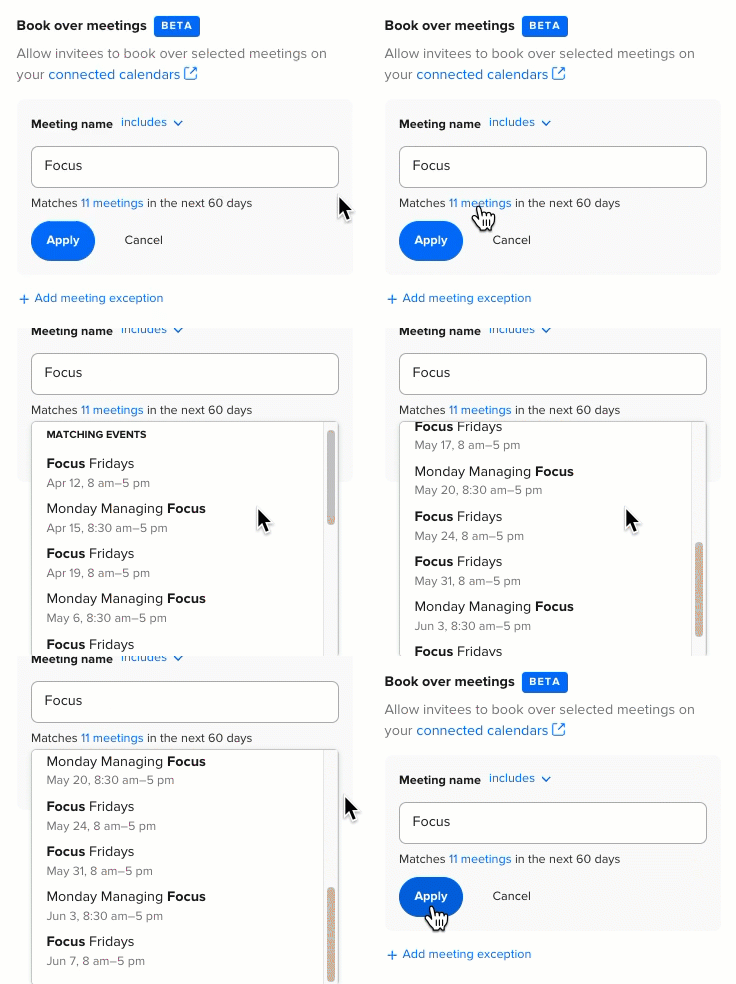
  • Enter your calendar event title into the search bar.
  • Select Apply to allow those meetings to be booked over for your event type.
    • By selecting Apply, all events listed within the 'x meetings' list can now be scheduled over for this event type.
​​​​​​​
Book over meetings apply meeting exceptions.gif


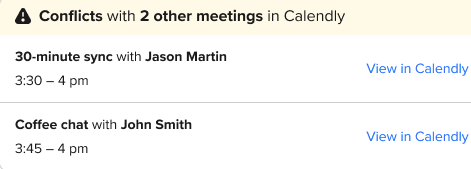
When setting up book over meetings, you can also book over Calendly meetings. When you do, you’ll get a notification in your 'New Event' email. Allowing for more visibility into any overlaps you run into.
 

Book over meetings conflict message.jpg


There you have it! Now you know how you can allow for overlapping event types within your Calendly account - opening up more flexibility and availability for you and your team! If you have any questions, post them below!


    19 replies

    New Community Member
    March 13, 2025

    How do I contact the support team directly to fix this issue? 

    David
    Community Manager
    DavidAuthor
    Community Manager
    March 13, 2025

    Hi ​@StudioDesigner-Heleena  - You can email support@calendly.com, or if you’re on a paid account, you can use the chat bubble from in your account to chat with them directly!

    Let me know if you have any questions.

    New Community Member
    April 14, 2025

    Thank you for this update. I would love for the feature to also allow for an additional meeting type to be booked through calendly itself. I am trying to allow for two event bookings to take place using the same booking link.

    David
    Community Manager
    DavidAuthor
    Community Manager
    April 15, 2025

    Hi ​@SLOlney - Thanks for reaching out!

    I think thats a great idea - One way to do this through the product currently is you can create a Group Event and set the max slots to two. This way, you can have two invitees choose the same time slot and both be booked. Once both slots are taken, that time would be made unavailable for anyone else.

    New Community Member
    April 18, 2025

    Hi ​@David re: the above comment about Group Event. I wanted to know if I can allow people to book through Calendy a separate group meeting alongside my usual 1-1 slots that are booked 

    David
    Community Manager
    DavidAuthor
    Community Manager
    April 18, 2025

    Hi ​@Emmaspeak - Yes you can! By using Overlapping Meetings, you can have two different Calendly meetings occur at the same time. You’ll just need to set both to ignore one another. You would just have two separate bookings pages for this.

    If you have any questions on this, let me know!

    New Community Member
    August 2, 2026

    Why is Calendly support telling me this can’t be done. Even though i have had events set up this way and I have future events set up this way but there is only 1 day i am having an issue with that I can’t seem to get to work and they keep telling me to pay for more users it’s not set up to work this way! 😡

    David
    Community Manager
    DavidAuthor
    Community Manager
    August 3, 2026

    Hi ​@Diana - So sorry that you’re running into this!

    You can read all about how to set this up in your account here: https://calendly.com/help/free-busy-rules-overview

    If you tell me more about your case, I can help find more information for you. :)

    New Community Member
    August 7, 2026

    Yep I have set it up that way. I have 2 classes, Open and 102, on the same dates and same times. Both have multiple dates to choose from so each class is set up exactly the same. All the dates are working fine except 1, 8/11. The 102 has bookings so when I troubleshoot that date for Open it is showing Overlap. I have 102 list to book over in the free/busy section, exactly the same as all the other dates but it’s not working.

    I have even tried to set up a different event at a different time for that date, 8/11, but when I go to do a test sign up the date does not show available on the calendar. When I do the troubleshooting the error is Duration. However my calendar is open at that time, I have made sure it doesn’t say busy, and I don’t have any working hours set up I always use the customer feature when i schedule events but I still can’t get it to work.

    No one from Calendly will get on a call to help me. I am paying a monthly subscription but because I am not paying the higher level no one wants to get on the call to troubleshoot the issue, only bots or chats that tell me this can’t be done, even though it’s how I have been setting up ALL my events! So frustrating!