

brutherford
Employee
Employee
January 5, 2026

See what’s new on your Meetings page
  • January 5, 2026
  • 16 replies
  • 1197 views

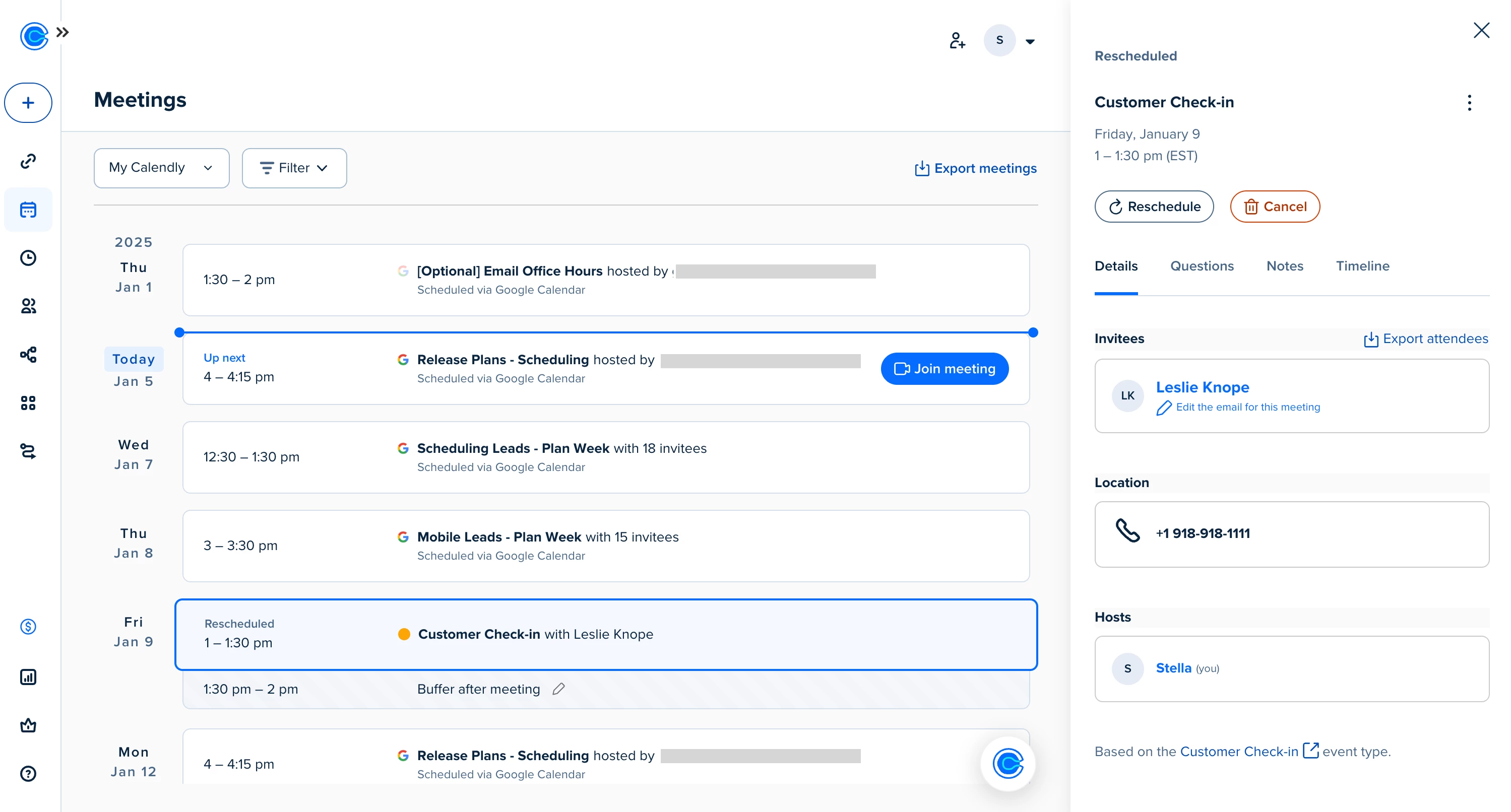
We’ve refreshed the Meetings page so you can quickly find, join, and take action on all your meetings from one place. Not seeing the updates yet? You will soon! 

You’ll still find the Calendly functionality you count on, now with a clearer, more connected view of your meetings. Let’s walk through what’s new — and how to make the most of your updated Meetings page. 


What’s new

✅ A simplified meeting view
Previously, upcoming and past meetings lived on separate tabs. Now, scroll to see what’s coming up — or look back at what’s already happened — all from the same page.

✅ Clearer meeting details
Click into a meeting to see the info you need (without digging). Details like attendees, location, invitee questions, and internal notes are neatly organized in the side panel.

✅ One place for all meetings
If you’ve connected your Google Calendar, you’ll now see those events on your page alongside your Calendly meetings so you can get a full picture of your day ahead. 


Check out all Meetings page updates in this help center article and demo video. 


More helpful connections

🔗 Meetings + Contacts
Every time a Calendly meeting is booked, that invitee’s contact profile is automatically created or updated. Click a name in the meeting details panel to quickly schedule a follow-up, send an email, or see their full contact record. 

📝 Notetaker access (beta)
If you’re using Calendly’s Notetaker, you’ll see the option to turn it on or off per meeting right from this page. You can also jump straight to your post-meeting recap as soon as your call wraps up. Don’t have Notetaker yet? Stay tuned!


We appreciate your feedback — let us know what you think about the new Meetings page by emailing us at support@calendly.com


Explore your new Meetings page

16 replies

David
Community Manager
Community Manager
June 16, 2026

Hey ​@Exel07141 - Can you share an example of what you’re seeing? Would love to take this back over to the team to share. :)

New Community Member
June 22, 2026

The update has completely ruined the clarity and usability of the meetings page overnight:

Previously, you could see the occupancy of upcoming appointments at a glance in the overview (for example: 11 out of 18).

Now, while you can see the number of bookings, you can only view the total number of available slots after clicking through to the details. Without the overview, this makes planning significantly more cumbersome and time-consuming.

Previously, invitees were simply listed by name in the event details. Recently, however, different invitees who registered using the same email address are all displayed multiple times under the same name. That just doesn’t make any sense.


And much more. Just read through the criticism here…

An unnecessary update that has turned into a frustrating downgrade.


Who came up with these mindless changes? There was never any need for them. And who approved this? No offense, but it appears like the Calendly employees in charge do not understand the most basic purpose of their own service.

Because of these changes, Calendly isn't making our work easier - it's actually making it much harder. It’s unbelievable how they could cripple their own product like this.

Exel07141
New Community Member
June 22, 2026

Hey ​@Exel07141 - Can you share an example of what you’re seeing? Would love to take this back over to the team to share. :)

Temporary workaround has been to include the client’s name in the Event Name. We have another Calendly account with over 100 clients as the Team Name and only “Open Enrollment” or “New Hire” as the event name. The team is unable to associate the event with the client, causing additional manual work for all involved which requires running a report on an hourly basis.


Exel07141
New Community Member
June 24, 2026

Hey ​@Exel07141 - Can you share an example of what you’re seeing? Would love to take this back over to the team to share. :)

Temporary workaround has been to include the client’s name in the Event Name. We have another Calendly account with over 100 clients as the Team Name and only “Open Enrollment” or “New Hire” as the event name. The team is unable to associate the event with the client, causing additional manual work for all involved which requires running a report on an hourly basis.


@David 

Exel07141
New Community Member
July 2, 2026

Hey ​@Exel07141 - Can you share an example of what you’re seeing? Would love to take this back over to the team to share. :)

Hoping this small item can be reverted to display Team Name.

New Community Member
July 7, 2026

Why does the book follow up button only appear after the sceduled meeting time has finished??? I either have to drag my meeting over the alloted time by a minute or two to be able to simply use the button or else I have to create a new meeting fom scratch whilst my client is online. What is the possible explanation for this - this was never an issue in the old version. This is not a UI issue - up until the meeting finish time the reschedule button is visible - once the meeting time has passed it changes to book follow up so it is obviously the design… it makes no sense!