

Solved

Availability glitch in rescheduling process

  • September 30, 2025
  • 2 replies
  • 228 views

So what’s happening is:

I have bookings on days that I will no longer be available for. I’m changing my availability going forward and so I need to reschedule quite a few bookings, specifically moving Tuesday bookings to Fridays.

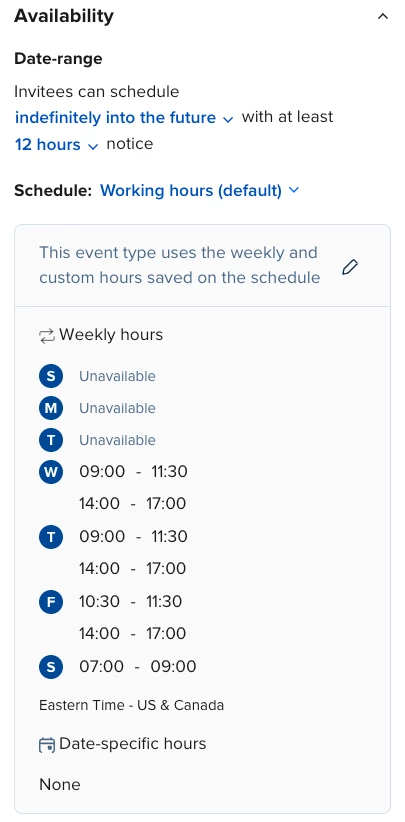
Below, you can see that my availability is correct for this event type. I changed my schedule in “Working hours” and it appears correctly here.
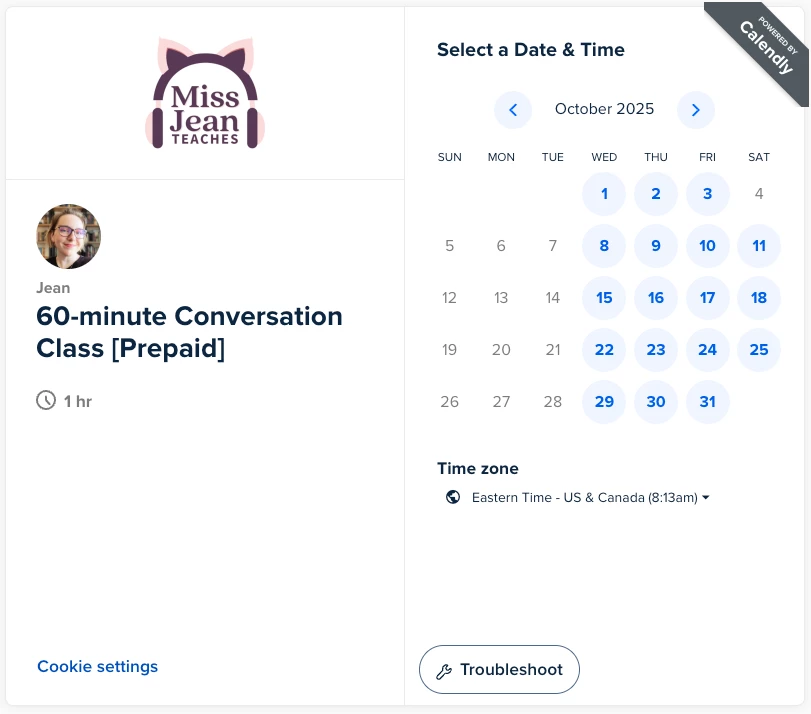
Below, this is the booking page for the event type I am trying to reschedule a booking from. You can see that the availability is correct.
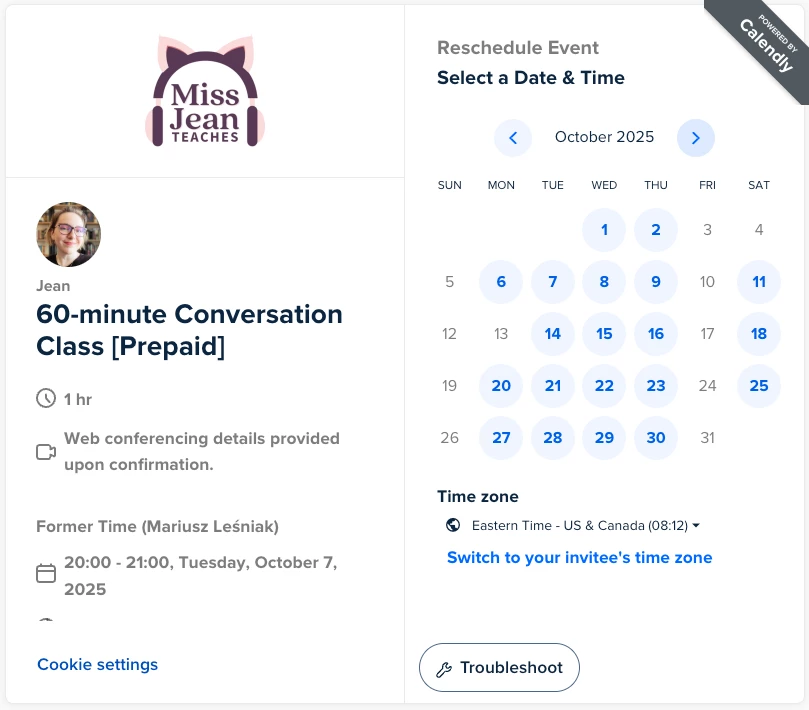
Now here’s the problem. I’m trying to reschedule a Tuesday booking to Friday. But here’s what I see when I try to do that:
Am I losing my mind? 

It’s showing my prior availability schedule, not the current availability, even though I’ve updated the “Working hours” schedule that is tied to this event type.

Hopefully there’s something obvious that I’m just missing. I’ve double checked that my availability is reflected across every event type. (As, as you can see in the second picture, the booking page shows the correct availability.) I even waited a day or two to see if it just needed time to update or something.

The rescheduling page doesn’t even allow me to override the availability. (The only workaround I could find was doing it on my phone, which, oddly enough, does let me override the availability.)

If someone could point me in the right direction on this, I’d appreciate it.

TIA

Best answer by Sean Marlin

Hi ​@Jean45302, that does sound maddening. I’d probably be puling my hair out honestly. Unfortunately you’ve found a known issue with Calendly. When you update your working hours or event type availability, the booking page for new events updates immediately, but the rescheduling flow for existing bookings may cache or reference the old availability. This is a limitation in how Calendly syncs availability for rescheduling versus new bookings. We are aware of this issue and actively working to resolve it.

Here are a few steps you can try:

  1. Disconnect and reconnect your calendar integration in Calendly. This often helps refresh your availability data.

  2. Clear your browser’s cache and cookies, or try using an incognito/private window. Sometimes, browser data can cause old availability to persist.

  3. Try rescheduling again after these steps.

  4. If the issue continues, you may find that the Calendly mobile app allows you to override availability and complete the reschedule.

If this doesn’t resolve the issue, please come back here and let us know. I’ll happily escalate your case. 

This topic has been closed for replies.

2 replies

Sean Marlin
Community Manager
  • Community Manager
  • Answer
  • September 30, 2025

Hi ​@Jean45302, that does sound maddening. I’d probably be puling my hair out honestly. Unfortunately you’ve found a known issue with Calendly. When you update your working hours or event type availability, the booking page for new events updates immediately, but the rescheduling flow for existing bookings may cache or reference the old availability. This is a limitation in how Calendly syncs availability for rescheduling versus new bookings. We are aware of this issue and actively working to resolve it.

Here are a few steps you can try:

  1. Disconnect and reconnect your calendar integration in Calendly. This often helps refresh your availability data.

  2. Clear your browser’s cache and cookies, or try using an incognito/private window. Sometimes, browser data can cause old availability to persist.

  3. Try rescheduling again after these steps.

  4. If the issue continues, you may find that the Calendly mobile app allows you to override availability and complete the reschedule.

If this doesn’t resolve the issue, please come back here and let us know. I’ll happily escalate your case. 


  • Author
  • Community Member
  • October 2, 2025

Hi ​@Jean45302, that does sound maddening. I’d probably be puling my hair out honestly. Unfortunately you’ve found a known issue with Calendly. When you update your working hours or event type availability, the booking page for new events updates immediately, but the rescheduling flow for existing bookings may cache or reference the old availability. This is a limitation in how Calendly syncs availability for rescheduling versus new bookings. We are aware of this issue and actively working to resolve it.

Here are a few steps you can try:

  1. Disconnect and reconnect your calendar integration in Calendly. This often helps refresh your availability data.

  2. Clear your browser’s cache and cookies, or try using an incognito/private window. Sometimes, browser data can cause old availability to persist.

  3. Try rescheduling again after these steps.

  4. If the issue continues, you may find that the Calendly mobile app allows you to override availability and complete the reschedule.

If this doesn’t resolve the issue, please come back here and let us know. I’ll happily escalate your case. 

Hey Sean!

Thanks for getting back so quickly!

I did steps 1 and 2 and the problem has persisted.

However, I was able to reschedule the classes through the mobile app using the override feature. (Not the most convenient just for the sheer volume of meetings I need to reschedule, but it’ll work. 👍🏻)

I’m glad the Calendly team is aware of this issue. Hopefully we’ll get a patch in a future update.

Thanks again for your help!