
[BUG?] Single-use meeting "minimum notice" feature keeps resetting
When making a Single-use link from one of my three meetings, I get the dropdown options for the date range, and minimum notice.
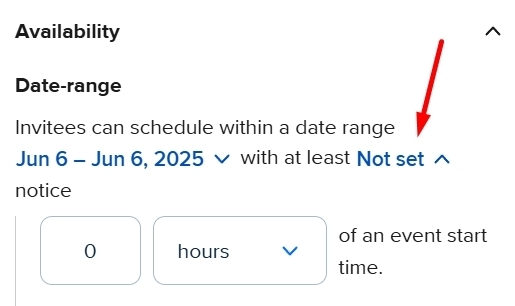
The date range works fine with overriding my meeting options, but the minimum notice option will revert back to the meeting value seconds after I select an override value.
Normally I reserve a 48hr (2 Days minimum notice) on my meetings. Occasionally, like today I have to send out a custom one-off for a client wanting to book last minute, which I have authorized this one time, but this minimum notice keeps reverting back to the 2 days main setting when I choose 0 day, or even switch it to 2 minutes.
I still need the meeting features like payment system, and questions I have for the meeting booking setup which is why I’m not just making a separate generic meeting for this.
The only way I’ve gotten this to work, is by changing the main meeting settings directly, of which I have to manually revert back after they book so I don’t get any other potential clients sneaking in a meeting earlier than my regular minimum.