Solved

Different duration per host in a Collective Event?

  • February 12, 2026
  • 6 replies
  • 46 views

Dear Calendly Community,

we are using a 90-minute Collective Event with three hosts in our organization.

Our desired scenario is:

  • Host A (CEO) should attend only the first 30 minutes of the meeting.

  • Hosts B and C should attend the full 90 minutes.

Currently, when a booking is made, the full 90 minutes are blocked in Outlook for all three hosts.

Our specific question:
Is it possible within a Collective Event to configure different attendance or calendar blocking durations per host?

If this is not supported:
What would be the recommended best-practice solution within Calendly (e.g., routing forms, combined events, workflows, or another configuration) to implement this setup?

Thank you in advance for your guidance.

Kind regards,
Francisco
Best answer by David

HI ​@Francisco82 - This sounds doable to me!

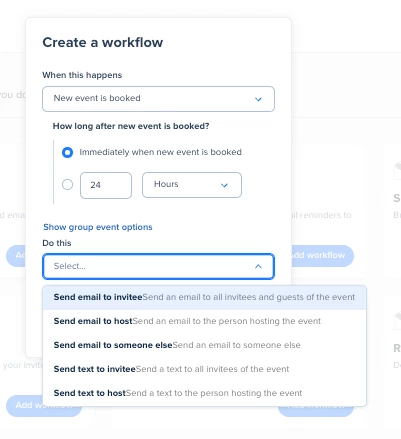
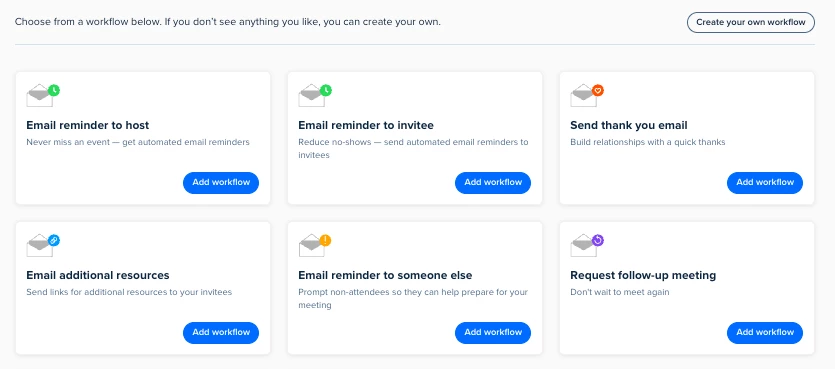
If you’d like to send a scheduling link automatically, I’d recommend using our Workflows feature. This will allow you to automate this process by sending the invitee another link either:

  • When a new event is booked
  • After an event ends
  • And more!

You can create new workflows from this page here: https://calendly.com/app/workflows/user/me


You can change the body of the email to include a link to schedule - Let me know if you have any questions!

This topic has been closed for replies.

6 replies

David
Community Manager
  • Community Manager
  • February 12, 2026

HI ​@Francisco82 - Thanks for reaching out.

Unfortunately Calendly does not support a workflow like this. All users included in the Collective event would be booked for the same time. I think the closest you could get it by switching the event to Email Confirmations which gives each user a separate Calendar Event - This way, the CEO could go in after it was booked and edit the calendar event to 30 minutes, but it would still remain the full 90 minutes for everyone else.

I’ll leave this thread open in case anyone else in the community has any other ideas, I’m sure that someone has run into this before.

Let me know if you have any questions.


  • Author
  • Community Member
  • February 12, 2026

Hi ​@David! Thank you very much for your quick and clear response — I really appreciate it.

I would be very grateful if anyone else in the community has additional ideas on how this could be handled without requiring manual adjustments afterward.

We have been considering a possible workaround: for example, linking a 30-minute meeting with a 60-minute meeting. The idea would be that all three participants join the first 30 minutes, and immediately afterward the remaining two participants continue with the additional 60-minute session.

Has anyone tried something similar, or found another way to structure this within Calendly?

Thanks again for your support!


David
Community Manager
  • Community Manager
  • February 12, 2026

Hi ​@Francisco82 - Some users have done this, yes. This is possible through the redirect function within the event settings (You can read more here: https://help.calendly.com/hc/en-us/articles/360040257613-How-to-redirect-invitees-to-another-site-after-booking)

The difficulty is if the Invitee is booking these events, theres a possibility where they don’t book times close together. So you might have the 30 minute meeting at 1pm, but the 60 minute meeting at 3pm. But if you’re the ones booking it on their behalf, I think what you suggested could work here.


  • Author
  • Community Member
  • February 13, 2026

Hi ​@David ,

thanks a lot for the tip. Unfortunately, it is exactly as you assumed: We send the link to the customer, and they select the time slot themselves. If the customer now has to book two separate appointments, it is very likely that these times won’t be consecutive — or may even end up on different days. That is something we absolutely want to avoid.

I was hoping there might be a way to add some kind of dependency or rule. For example, Calendly could check the calendars of the three organizers to find a 30‑minute slot for Person A, and then a matching slot for Organizers B and C where they have 30 minutes + an additional 60 minutes available — and then only show the customer those connected time slots.

Since this isn’t possible at the moment, we will probably handle it as follows:
We will create a 30‑minute Collective Event with Organizers A, B, and C and call it “Kick‑Off Meeting.” Once the customer has booked this meeting, we will send a second scheduling link for another Collective Event (90 minutes) with Organizers B and C.

Is there any way to automate this second step? Meaning: Once the customer books the Kick‑Off meeting, an automatic email is triggered that sends the link for the second (90‑minute) meeting?

Thanks again for your support and best regards from Fulda, Germany
Francisco


David
Community Manager
  • Community Manager
  • Answer
  • February 13, 2026

HI ​@Francisco82 - This sounds doable to me!

If you’d like to send a scheduling link automatically, I’d recommend using our Workflows feature. This will allow you to automate this process by sending the invitee another link either:

  • When a new event is booked
  • After an event ends
  • And more!

You can create new workflows from this page here: https://calendly.com/app/workflows/user/me


You can change the body of the email to include a link to schedule - Let me know if you have any questions!


  • Author
  • Community Member
  • February 13, 2026

Hi ​@David,

great, many thanks. I will try it out.