Question

Duration menu is transparent

  • October 11, 2025
  • 5 replies
  • 57 views

Hello,

I’ve created some events and I realized that on the booking page, the menu to choose the duration looks transparent and is not very readable:
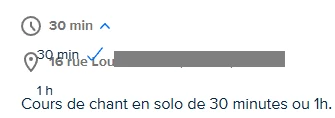
 

Is there a way to fix this ? Or a place to report bugs as paid members ?

Cheers !

This topic has been closed for replies.

5 replies

David
Community Manager
  • Community Manager
  • October 13, 2025

Hi ​@440coursdechant - thanks for reaching out!

Just to confirm, if you log into Calendly from a different web browser, does this behavior carry over? Additionally, if you try clearing your cache and cookies, does the issue still present itself? You can follow the instructions here on how to do this: https://its.uiowa.edu/services/how-clear-cache-and-cookies-your-web-browser

Let me know!


  • New Community Member
  • October 24, 2025

I have this same issue. I have tried on Chrome and Safari, cleared my cache, tried in private/incognito mode, and via mobile browser. The background is transparent. This is for all of my calendly pages/links. Here’s one for you to see and a screenshot.


David
Community Manager
  • Community Manager
  • October 24, 2025

Okay great, thank you for checking that ​@Dr.87301 - Let me take all of this to my team, I’ll let you know once I have an update!


David
Community Manager
  • Community Manager
  • October 24, 2025

Hi ​@Dr.87301 Thank you again for sending it over.

Our team is aware of it and is actively investigating it. Once I hear any updates I’ll let you know!

In a pinch, you can also reach out to our support team via chat or email to get updates on this in the future. :)


  • New Community Member
  • October 24, 2025

@David Thank you so much!