Question

Error "Your meeting request could not be finalized with this host" When people try to book a meeting

  • June 2, 2025
  • 22 replies
  • 2892 views

Hello,

when people try to book a meeting they see this error:
 

Oops, something went wrong.

Your meeting request could not be finalized with this host. If you feel you've reached this message in error, please reach out to support with below error code.
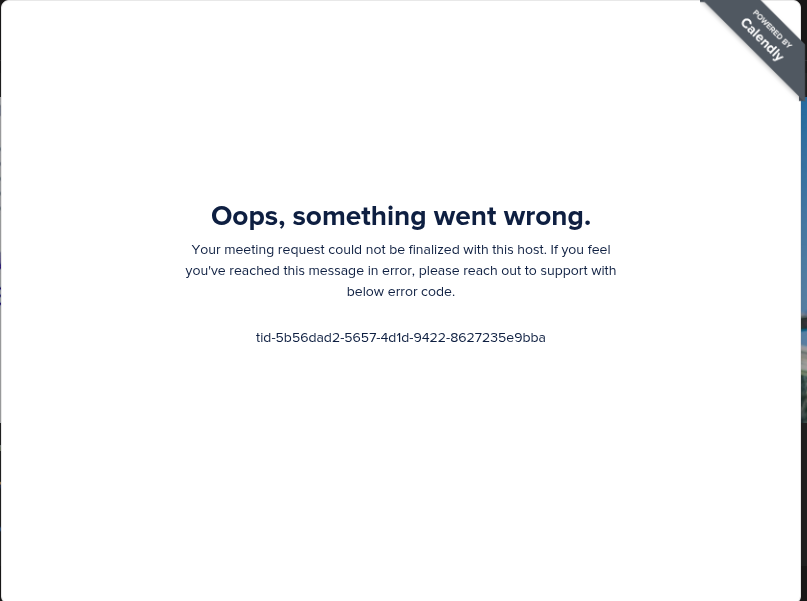


Even when I try to preview the booking page here in Calendly and try to schedule a test event I see the same error.

Has anyone seen similar problem? Any idea?

Will appreciate any help.

This topic has been closed for replies.

22 replies

  • Author
  • Community Member
  • June 2, 2025

Reproduces stably. Everytime attempt to book a meeting results in this error.


David
Community Manager
  • Community Manager
  • June 2, 2025

Hi ​@Quote77242 - Thanks for reaching out!

Just to confirm, is this for all your invitees? If you create a new default 30 minute meeting, does the same thing occur, or is only this meeting? Can you reproduce this in different browsers? 

Let me know! I can dig a bit deeper from there.


  • Author
  • Community Member
  • June 2, 2025

@David thanks for suggestion. I will try tomorrow to create a new meeting and check.


  • New Community Member
  • June 18, 2025


  • New Community Member
  • June 18, 2025

I’m seeing this issue as well the last couple of days. It’s even booking times in the wrong time zone so then I have to reschedule it again either on the Calendly app or website. Whatever works but then the customer gets multiple emails cancelling and rescheduling which looks unprofessional.


David
Community Manager
  • Community Manager
  • June 18, 2025

Hi ​@Tom44585 - Seems like there are a few different things going on here.

First, I’d recommend clearing your browsers cache and cookies and see if the issue persist: https://its.uiowa.edu/services/how-clear-cache-and-cookies-your-web-browser

If you continue to get this error, I would send the information over to our support team so they can dig into it further. You can email them directly at support@calendly.com

Let me know if you have any questions.


  • New Community Member
  • June 30, 2025

Hi, 

I have the same problem as others above. I tried multiple different email addresses, deleted cache and cookies, and the problem still exist. 

Can someone share it with me what solved your problem, please? 

Thank you. 


  • New Community Member
  • July 6, 2025

Hi, I keep facing the same error. I’ve tried just about everything, no solution whatsoever. 


jillian
Community Manager
  • Community Manager
  • July 7, 2025

Hi ​@Eko12837 and ​@D.O.G.E68812,

Is this issue still occurring? If so, please do contact our support team as David advised above. This isn’t an issue we’re able to replicate so having someone be able to dig into your account and what’s happening will be helpful!


  • New Community Member
  • July 11, 2025

I am also receiving this error at booking


  • New Community Member
  • July 14, 2025

I’ve also been getting an error code when trying to schedule on mulitple peoples calendars. 

Oops, something went wrong.
Your meeting request could not be finalized with this host. If you feel you've reached this message in error, please reach out to support with below error code.
tid-4fd394a2-bc99-47c5-86d2-64414ee3d1db


  • New Community Member
  • August 3, 2025

tid-4fd394a2-bc99-47c5-86d2-64414ee3d1db ошибка та же самая, в чем может быть дело? до этого нормально регистрировалась в календаре 


  • New Community Member
  • August 12, 2025

Hi Calendly team!

We are still facing this issue. I’ll contact you via chat support.

Best regards!


  • New Community Member
  • August 20, 2025

I encountered this problem when booking a time with my coach as well. Would appreciate if can get support.


The error message I got was “tid-4fd394a2-bc99-47c5-86d2-64414ee3d1db”.


David
Community Manager
  • Community Manager
  • August 20, 2025

Hi ​@Fan65585 - The best place to take these “tid” errors is to our support team - they’ll be able to investigate further from there!

You can either chat in from within your account, or by emailing support@calendly.com


  • New Community Member
  • August 21, 2025

I can’t schedule any appointments with anyone using calendly because of this error. It’s extremely limiting. 

I’ve also cleared my cache and used entirely different browsers. Nothing fixes it.  


Help.


David
Community Manager
  • Community Manager
  • August 22, 2025

Hi ​@Davis - The best place to take these “tid” errors is to our support team - they’ll be able to look into whats causing it for you specifically.

You can either chat in from within your account, or by emailing support@calendly.com.

Let me know if you have any difficulty with this.


  • New Community Member
  • August 26, 2025

Sounds like you haven’t solved the TID problem. I have one client who receives this message, but everyone else seems to be able to get through.


  • New Community Member
  • September 15, 2025

adding onto this, I’ve had a couple partners mention this. major curveball.

this absolutely feels like a back end issue. Front end wise, I have a team look into it. Without access to the calendly team’s servers, we obviously can’t know for sure, but we eliminated multiple angles for this being user-error.

happy to schedule a business meeting to share our data, if someone reaches out. (Note: I do not check replies, please email our team)


David
Community Manager
  • Community Manager
  • September 15, 2025

Hi ​@Bree - Thanks for reaching out.

The best place to take these “tid” errors is to our support team - they’ll be able to investigate and determine exactly why you’re seeing that error.

You can either chat in from within your account, or by emailing support@calendly.com


  • New Community Member
  • September 24, 2025

Adding to this as well. Maybe it will help - the issue I'm having is with LinkedIn DMs. For whatever reason, people can't see the meeting page. Your support has access to this community page for sure - what's the progress on solving these issues?


  • New Community Member
  • September 25, 2025

Having the same issue, just as I was recording a product demo. ugh!