Event marked as canceled in Google Calendar, but no Calendly notification – what could cause this?

  • April 24, 2026
  • 3 replies
  • 44 views

Hello dear Calendly community,

I have a technical question regarding Calendly in connection with Google Calendar and would really appreciate your input.

Situation:

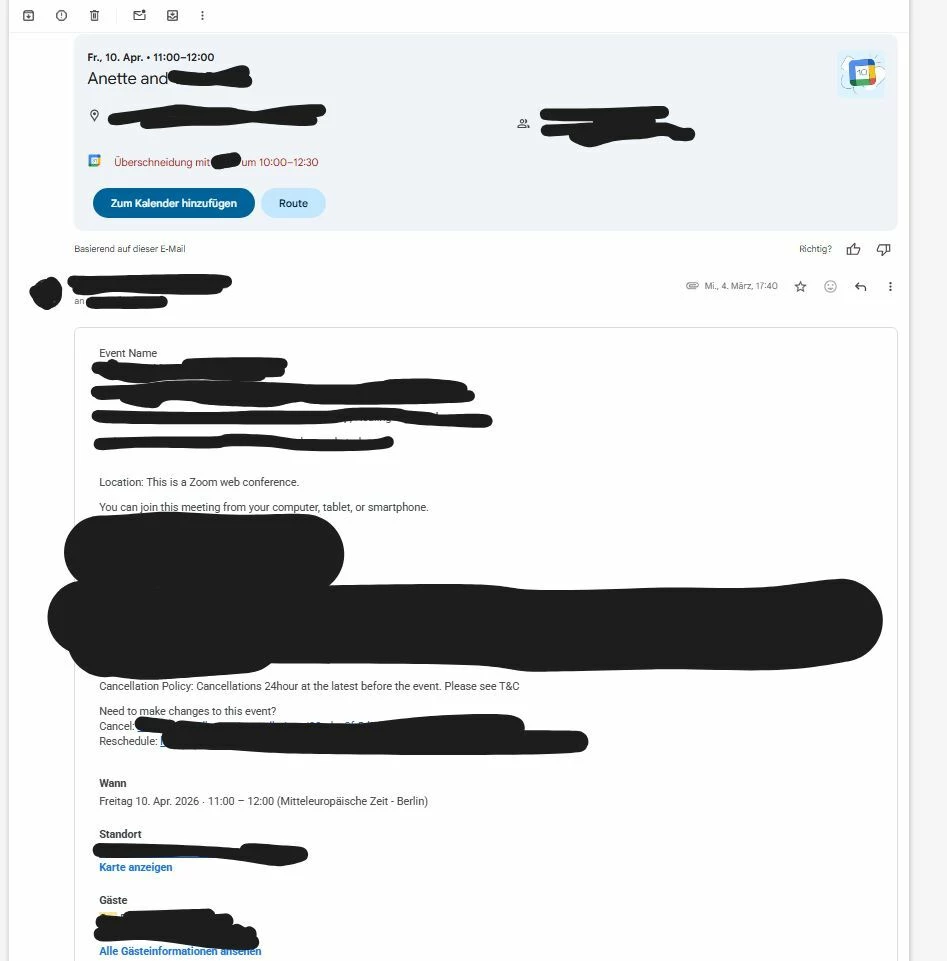
I booked a coaching package with a service provider. Several appointments were postponed or canceled multiple times. For April 10, 2026 at 10:00 AM (UK time) in my time it is 11:00 AM (Germany, in my screenshot i had english and german language

), I had a confirmed appointment via Calendly.

On April 9, I asked for confirmation to make sure the session would take place. The provider then told me that I had canceled the appointment. As proof, I received a screenshot from their Google Calendar, which only showed the status “canceled,” but no related email or change details.

The issue:

I did not cancel or reschedule the appointment (I genuinely cannot recall doing so)
I did not receive any cancellation email from Calendly
For all other changes (including my own tests with a Calendly free account), I always receive a notification
In my tests (also using two Google accounts), every cancellation or reschedule was reliably documented via email
When I delete or decline events directly in Google Calendar, they are marked as “declined,” not “canceled”

Additional context:
The appointment was not booked directly by me through Calendly, but manually scheduled by the provider as part of a package. However, I did receive a standard Calendly confirmation email.

My question:
Is it technically possible for a Calendly event to appear as “canceled” without the participant receiving any corresponding email or notification?

Or does this rather indicate that the cancellation did not happen through Calendly itself?

I want to clarify this objectively and avoid making any false assumptions, but I’m currently unsure how to interpret this technically.

Thank you very much for your help!


3 replies

David
Community Manager
  • Community Manager
  • April 24, 2026

Hey ​@Anett54174 - Super appreciate all the context here, this helps a lot!!

To answer your question, yes, although rare, it is possible for Calendly events to get cancelled without a notification being sent. This is not expected behavior, the host would want to work with our support team to see what might of happened. Calendly should also show them who and when the event was cancelled as well. 

In a pinch, you can also email this over to our support team (support@calendly.com) to see where this notification ended up, or if one was triggered in the first place. They’ll have a lot more insight into what might of happened here!

Most often when this happens, its usually an issue with the hosts Google calendar that causes this to happen, but the support team would need to dig into this more to see what went wrong.

Let me know if you have any questions!


  • Author
  • Community Member
  • April 26, 2026

It is extremely important for me to clarify whether I, as the participant, initiated the cancellation of this appointment, as this would be highly uncharacteristic of me. At that time, I had a strong interest in attending the session. If any change had been necessary, I would have rescheduled the appointment rather than canceling it.

Unfortunately, the person concerned is no longer responding to my messages, so I have no way of independently obtaining a clear answer or a screenshot showing who actually initiated the cancellation.

I have already contacted your email support and provided all relevant, uncensored screenshots as well as the booking confirmation from the email address I used to schedule the appointment. However, I currently have the impression that the host is being protected, while my concern as a participant is not being sufficiently addressed.

I would like to emphasize that I am not requesting any personal data of the host. I am simply asking for a clear confirmation as to whether the cancellation was initiated by me and—if possible—whether I provided a cancellation reason, as this is an option on the Calendly platform.

As a participant and as a consumer, I would like to understand my rights in this situation. It should be possible to provide information about my own actions on your platform without violating the host’s data protection rights. In particular, it should be possible for you to confirm whether I initiated a cancellation or a rescheduling of this appointment and, if so, whether I provided a reason.

I kindly ask for a clear clarification of this matter.

Thank you very much for your support.


David
Community Manager
  • Community Manager
  • April 27, 2026

Hi ​@Anett54174 - Totally understand where you’re coming from, I see that the Support team has gotten back with you already.

Similar to what the Support team has already shared, they recommend reaching out through the privacy form to obtain the information you requested. You can access the link here: https://calendly.com/?redirect=false&privacy-center=true

I’d recommend selecting Other Request or Inquiry under the Submit a request tab. They’ll be able to assist more from here!