
Few questions / SMS reminders/different profiles/events
Hello, I have a few questions. I am a real estate agent and I created a Calendly account to manage my property viewing appointments.
My first question is: Can I reserve specific days exclusively for certain neighborhoods? I have already created multiple "events" to differentiate my neighborhoods, but I couldn't find a way to "lock" or restrict specific days to a particular event.
Second question: Can I invite my colleague to my calendar and set up a system (using colors or different profiles) to say, for example, "I am taking this day, and she is taking that day"? I also need her to receive her appointment notifications directly in HER own inbox. Is this possible?
Third question: Can I make SMS reminders mandatory? I did a test booking, and the SMS reminder was optional (if I didn't fill out the phone number field a second time for SMS, I didn't get a reminder). I really need this to be required because prospects don't check their emails often when an appointment is coming up.
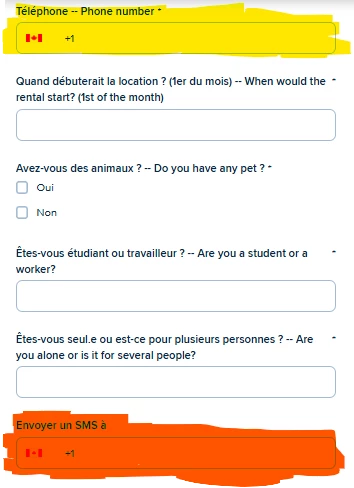
Here is a screenshot of my appointment booking, before confirmation. Items in yellow are mandatory; the item in orange—the "SMS reminder"—is something I would like to be mandatory.
Fourth question: Is it possible to send a reminder 1 hour before the appointment with an option like "Press 1 to confirm, Press 2 to cancel"? Maybe with a paid profile? (I'm still on the trial version to test my calendar).
Fifth question: I did a test where I specified for 2 events (2 neighborhoods) that pets were not allowed. However, when I did a fake booking and checked "Yes, I have pets," the appointment was still confirmed anyway. Did I do something wrong?
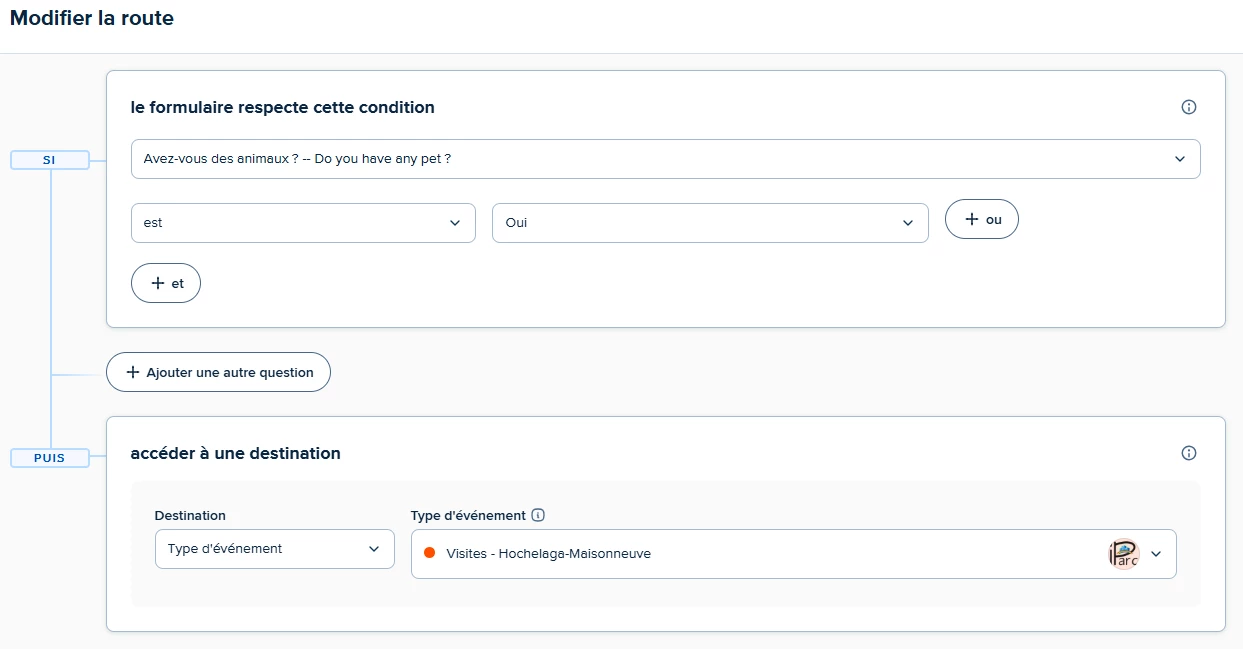
Here is a screenshot of the routing form I created for this issue. I selected only the neighborhood where pets are allowed, and I did a test booking by choosing one of the other neighborhoods (where pets are forbidden). Yet, the appointment was still confirmed…
🙌 Thank you for your patience and your help! 🙌