Solved

How can I set ALL Outlook Tentative meetings so Calendly thinks they are Available/Free?

  • July 8, 2026
  • 7 replies
  • 45 views

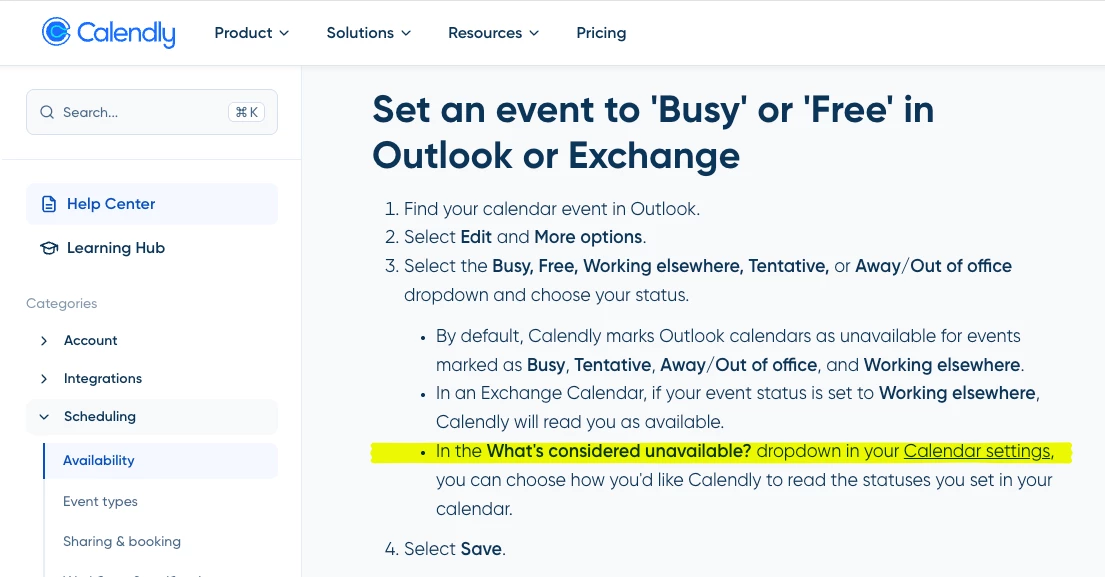
Calendly used to allow me a setting to treat ALL my Outlook Tentative meetings as “Available” for someone to schedule a Calendly meeting with me.  This was great!  I set all my Outlook meetings that are “low priority; attend if you can” to Tentative. And Calendly would treat all of them as Free so that external people could select that time and “book over” my internal meeting. Perfect! 😃 And there is a Help Center topic that suggests I can still do that (see screenshot of 2026-07-08 in USA). 

But now it seems I have to individually set meetings by name in order for Calendly to book over them.  Or else I need to set my Outlook RSVP to “Free” which confuses the internal meeting organizers: am I attending or not? 

Is there still a way to indicate “Treat Tentative meetings as Free” for ALL my Outlook meetings in Calendly?  If not, this is a significant downgrade to my workflow. 😥
 

Best answer by David

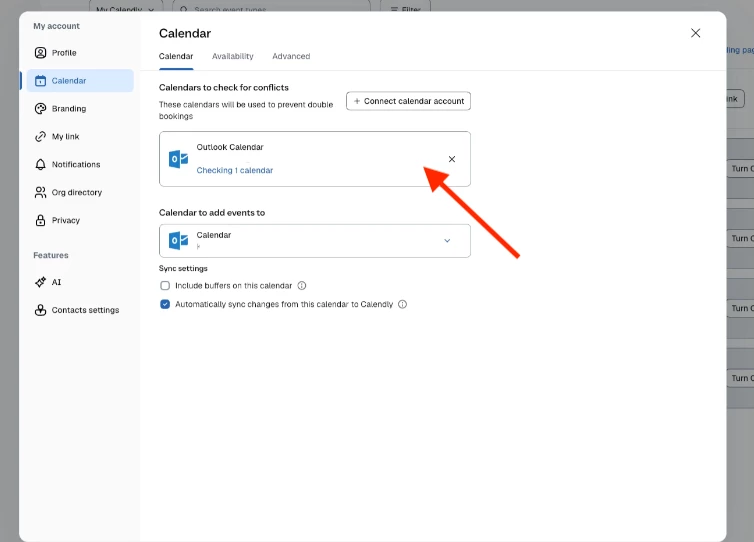
Hey ​@KimT_WK20 ! You’re on the right track, just select your calendar here to view the calendar settings:


7 replies

  • New Community Member
  • July 14, 2026

the thing tripping this up is that outlook has two separate fields people think are one. there's your rsvp to the organiser, accept / tentative / decline, and there's how the event shows on your own calendar, busy / free / tentative / out of office. calendly reads the second one, not the first.

so you don't actually have to choose between confusing the organiser and being bookable. rsvp tentative, which is what the organiser sees, then separately set show as to free on that event in your own calendar. organiser still sees you as tentative, calendly sees free and lets people book over it. same outcome you had before, reached from a different field.

the catch is it's per event, which is the manual thing you're trying to escape. that part is automatable though, show as is a property that can be written to, so a rule along the lines of "anything i've marked tentative gets show as flipped to free on my calendar" can run in the background and you'd never touch it again.

and if the old global setting is genuinely gone rather than moved, worth filing it as a feature request in here too. you won't be the only person who built a workflow on it.


  • Author
  • Community Member
  • July 14, 2026

the thing tripping this up is that outlook has two separate fields people think are one. there's your rsvp to the organiser, accept / tentative / decline, and there's how the event shows on your own calendar, busy / free / tentative / out of office. calendly reads the second one, not the first.

so you don't actually have to choose between confusing the organiser and being bookable. rsvp tentative, which is what the organiser sees, then separately set show as to free on that event in your own calendar. organiser still sees you as tentative, calendly sees free and lets people book over it. same outcome you had before, reached from a different field.

the catch is it's per event, which is the manual thing you're trying to escape. that part is automatable though, show as is a property that can be written to, so a rule along the lines of "anything i've marked tentative gets show as flipped to free on my calendar" can run in the background and you'd never touch it again.

and if the old global setting is genuinely gone rather than moved, worth filing it as a feature request in here too. you won't be the only person who built a workflow on it.

Thank you for your response, but I’m not sure this answer is completely relevant. I am the Organizer. I want Calendly to show my invitees all the spots on my Outlook calendar that are currently Free AND ALSO all the spots on my Outlook calendar that are currently Tentative. 

As the Organizer (I am a UX Researcher who books interviews with users of our software), I want Calendly to be able to book over ALL OF my Tentative items as it used to do.  There was previously a simple checkbox that said something like “Treat the following as available” and offered me choices that included “Tentative”. And voila, all of my internal coworkers saw my time as Busy/Tentative/Free/OOO but all of my invitees via Calendly saw my Tentative slots as available.  I want to be able to let my co-workers know I am Tentative to attend their (lower priority for me) meetings.  And I want my invitees (research participants) to be able to book over all of those meetings where I have rsvp’d to a coworker as Tentative. Calendly invitees should not be aware I have any Tentative meetings; those should ALL look like Available time with one simple setting on my part (as Calendly used to offer).


David
Community Manager
  • Community Manager
  • July 15, 2026

Hey ​@KimT_WK20 - Thanks for reaching out on this!

You should still be able to set what Calendly considers as unavailable through your Calendar Connections page. Once you select your calendar, you should see another dropdown to configure this:


Can you check to make sure its not selected? That should make those spots open again!

Let me know. :)


  • Author
  • Community Member
  • July 15, 2026

Thank you ​@David that is exactly the settings screen I remember and can no longer find! 

I see only these options (3 screenshots attached).  I have tried Settings; Calendar > Availability; Automations; and explored other navigation and paths but keep arriving back at only these 3 screens showing only these options.


David
Community Manager
  • Community Manager
  • Answer
  • July 15, 2026

Hey ​@KimT_WK20 ! You’re on the right track, just select your calendar here to view the calendar settings:


  • Author
  • Community Member
  • July 15, 2026

Thank you ​@David - I found it!! That is a bit hidden for such a valuable feature. And Tentative was indeed unchecked (which should show me as available for booking).
I swear it was not working as intended when I posted the question, but now appears to be working exactly as I had hoped! I no longer need to indicate the names of all the individual Tentative meetings my participants will see as Available and be able to book-over.
Thank you so much!!! (And thank you for your kind & patient answer!)


David
Community Manager
  • Community Manager
  • July 15, 2026

So glad to hear it! 

Happy I could help! :)