Community Member
May 13, 2024
Solved

How to create a secret event?

  • May 13, 2024
  • 13 replies
  • 717 views

I have a standard account with Calendly. I wish to create a package booking and my inderstaning is that I need to make part of the package sercet. However I dont have that option when I click on the cog symbol. Can you please help? Thank you in advance. 
 

This topic has been closed for replies.
Best answer by Kelsi

Hey there! Thanks for your post. Great question. 🤗

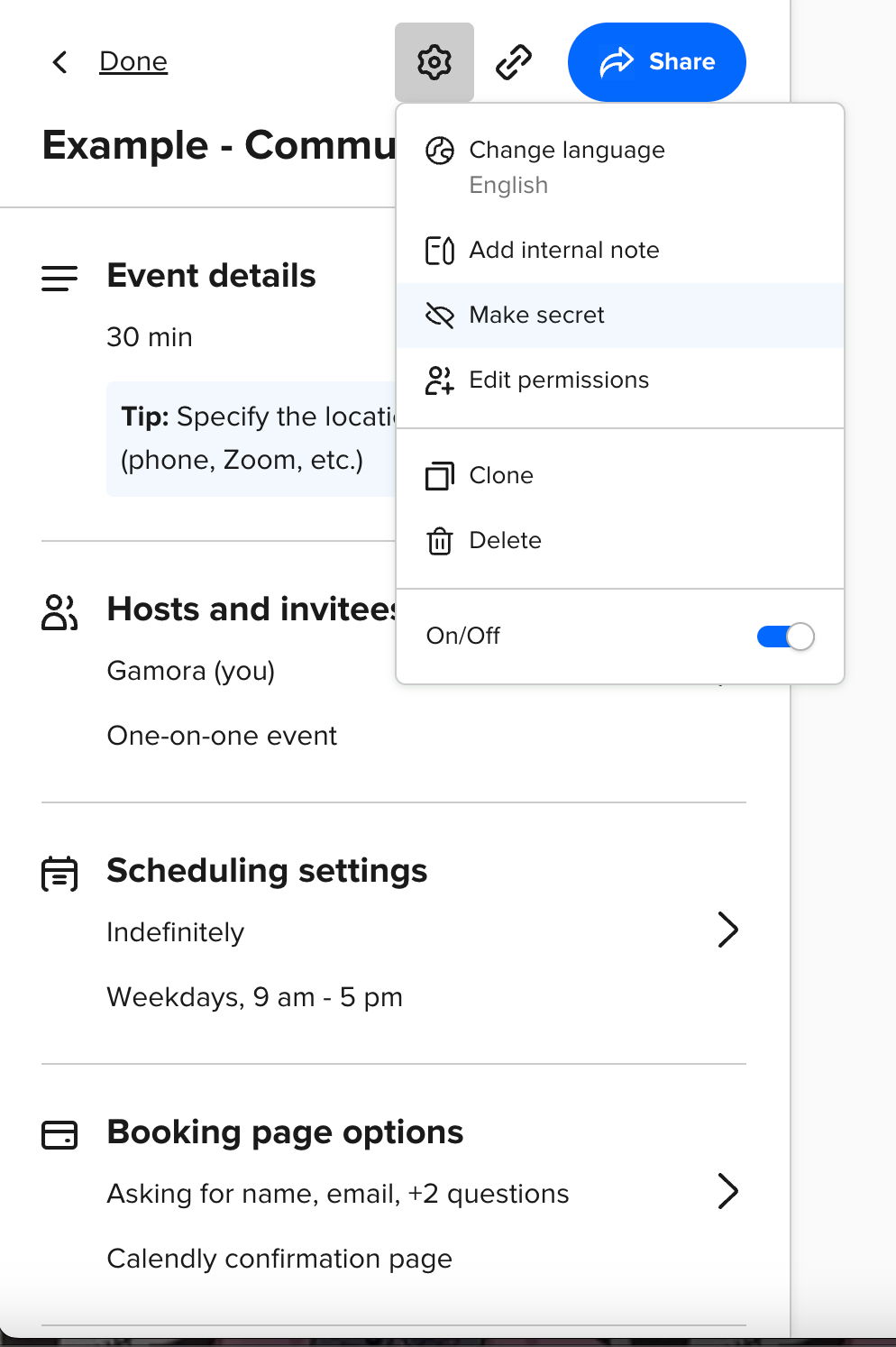
When you click into an event type, click the “gear” in the top right corner of the editor > click “make secret”.

You’re all set!

13 replies

New Community Member
May 25, 2024

Thanks guys that is really helpful 

Kelsi
CalPal Emeritus
May 28, 2024

Kelsi, I am disipointed that I didnt get a reply to you last email. I am unable to contact Calandly. I have purchased a package that it not providing me with a service I expected. I cant contact the admin or the office as when I access the page it want acceot a message from me. Can yo please advice how I can address my queries /poblems.   

Hey! I am so sorry, and 100% understand your frustration here -- the last response I sent to you, here, was on May 15th, and I did not hear back from you after that. I was unaware you were still waiting to hear back -- or I would have absolutely reached out sooner. =) I totally agree that you need quick assistance on this matter. Let’s get you connected with support! 

If you are having issues using live chat, please try the following: 

  • clear cache and cookies (steps below -- this usually solves the problem immediately)
  • try a different browser
  • try an incognito or secret browsing window
  • try a different device
  • install any browser and/or device updates and restart the browser/device

How to clear browser cache

Browser Link for steps
Chrome https://support.google.com/accounts/answer/32050?co=GENIE.Platform%3DDesktop&hl=en
Firefox https://support.mozilla.org/en-US/kb/how-clear-firefox-cache
Safari https://kb.wisc.edu/page.php?id=69468
IE 11 https://kb.wisc.edu/page.php?id=15141
Edge https://support.microsoft.com/en-us/help/10607/microsoft-edge-view-delete-browser-history


If you are still unable to connect with support via live chat after these troubleshooting steps, please let me know with a response here on your post. I will look into it for you at that time!  

Edit: our support team should be reaching out to you via email. Please keep an eye out! 

Kelsi - Calendly Community
New Community Member
January 6, 2025

I was having the same issue and stumbled upon this post, but then found the solution so thought I’d share it here for the next person.

I also didn’t have the “Make secret” button on the gear dropdown when looking at the Event types page. I found that if I clicked on each individual Event type to Edit them, then there is another gear dropdown at the top of the page towards the left. This one does contain the “Make secret” option.


It’s “Make public” in this screenshot as I had already made it secret and taken the screenshot and couldn’t be bothered to do it again.