Question

How to remember this

  • May 20, 2026
  • 5 replies
  • 37 views

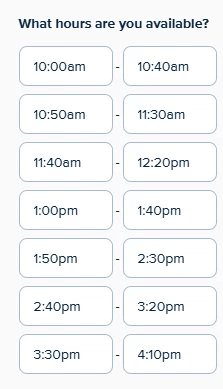
Hiya! I usually want my meetings to this schedule as below. Is there a way to set this as a default? If I have one day like that I can copy it but often I don’t, plus I have several meeting types as well, so I need this across all types. Thanks!


5 replies

David
Community Manager
  • Community Manager
  • May 20, 2026

Hey ​@Brad31763 - Thanks for reaching out!

You can do this from our Availability tab here: https://calendly.com/app/availability/schedules

You can adjust your schedule AND set which events its active on here: 


Let me know if you have any questions!


  • Author
  • Community Member
  • May 20, 2026

Maybe I need to change my default working hours? I’ll see if I can work that out as it seems more logical.


  • Author
  • Community Member
  • May 20, 2026

Eeek, that’s even more obscure! Is there a step-by-step example for dummies about how to set up and then apply a custom schedule? 😅


David
Community Manager
  • Community Manager
  • May 21, 2026

Hi ​@Brad31763 - I have two things you can read through here to help!

  1. You can reference a video guide here: https://calendly.com/learn/getting-started#lesson-3
  2. You can read more about configuring your availability on our help center here: https://calendly.com/help/how-to-set-your-availability


Let me know if this helps!


  • Author
  • Community Member
  • May 24, 2026

Thanks - I get it now, I've been looking at a schedule as a thing per event type, rather than a schedule overall which I can then use per event type. And if I decide on a particular day I can only make a morning, I edit that at the Availability level for that date, not per Event Type. Got it!