Solved

I want to go back to the free plan completely, but there is only a fare pause going on.

  • April 7, 2025
  • 6 replies
  • 277 views

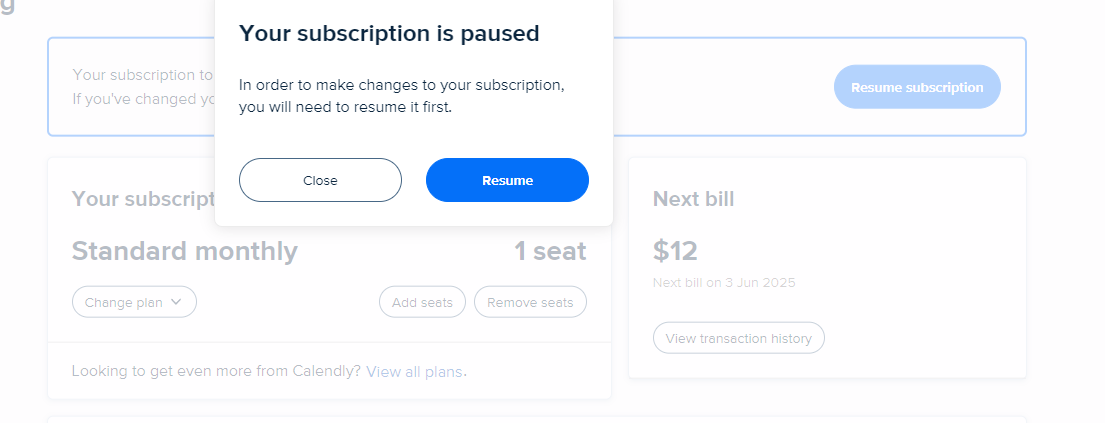
I had a paid monthly plan, after a month I wanted to go back to the free plan, but I only get a pause. I don't see anywhere that I can cancel the plan completely.  See screenshot, this is when I click on downgrade. The payment information can't be removed either. Please help me to completely switch to a free plan
 

Best answer by David

Hi ​@Yakov - Thanks for reaching out.

I think in this case you will need to select the Resume button first, then go back through the process again to cancel it fully. This will occur from time to time - but if you continue to run into any issues, I recommend chatting in with our support team to resolve this. They’ll be able to look into your account directly and help out here!

Thank you.

This topic has been closed for replies.

6 replies

David
Community Manager
  • Community Manager
  • Answer
  • April 8, 2025

Hi ​@Yakov - Thanks for reaching out.

I think in this case you will need to select the Resume button first, then go back through the process again to cancel it fully. This will occur from time to time - but if you continue to run into any issues, I recommend chatting in with our support team to resolve this. They’ll be able to look into your account directly and help out here!

Thank you.


Olá

Iniciei agora e estou no plano gratuito, mas ao pesquisar na plataforma vi que ele está com 5 dias restantes de avaliação. 

Dúvida, após esse período restante de 5 dias vou para um plano pago? Porque nesse primeiro momento gostaria de continuar só com o plano gratuito até entender mais da ferramenta.


David
Community Manager
  • Community Manager
  • April 8, 2025

Olá@Exatidão51777 - Obrigado por ter contactado!

Uma vez que iniciou a sua conta recentemente, será automaticamente adicionado a um teste do nosso plano Teams, após o término do teste, será automaticamente transferido para o plano gratuito. Assim, tem tempo para testar qualquer funcionalidade de que necessite.

Informe-me se tiver alguma dúvida! 


  • Author
  • Community Member
  • April 13, 2025

Hi ​@Yakov - Thanks for reaching out.

I think in this case you will need to select the Resume button first, then go back through the process again to cancel it fully. This will occur from time to time - but if you continue to run into any issues, I recommend chatting in with our support team to resolve this. They’ll be able to look into your account directly and help out here!

Thank you.

Hello, ​@David! Thank you!

Could you please tell me how to contact customer support directly? When I resume - won't I be charged for the plan?


David
Community Manager
  • Community Manager
  • April 14, 2025

Hi ​@Yakov - If you run into any issues, you can email billing@calendly.com to be connected with them. If you’d like to chat in instead, you can use the blue chat bubble when signed into your account:


  • Author
  • Community Member
  • April 17, 2025

Hi ​@Yakov - If you run into any issues, you can email billing@calendly.com to be connected with them. If you’d like to chat in instead, you can use the blue chat bubble when signed into your account:


Hi, ​@David , thank you!