

Sam S
Employee
Employee
January 19, 2024

Offering a Series or Package of Events

  • January 19, 2024
  • 15 replies
  • 6348 views

Howdy Cal Pals! Quick question for you– Do you want to offer your invitees the option to book a series of events, or an event package where they pre-pay for multiple sessions?

While event types don’t natively support a series or package of events, I have a neat workaround you can use to accomplish your scheduling goals!


Problem: Event types in Calendly do not natively support a series or package of booked events.


Solution: Using the invitee redirect feature, you can “daisy-chain” event types together. Rather than seeing the Calendly confirmation page after booking, invitees will be automatically forwarded to the booking page of the next event in the series. 

You can collect payments on the initial event type, then redirect invitees to a secondary secret event type (without payment collection enabled) with instructions to schedule another meeting.


Who Can Use This?

Calendly’s redirect feature is available to users on our Standard, Teams, and Enterprise plans, as well as the legacy Professional plan. 

FYI: The Teams plan is available for both multi-user organizations as well as for individual use. To learn about the features in each plan, feel free to check out our pricing page!


Set Up Your Event Series

Because there are so many possible use-cases for this workaround, I’ve found that the best way for me to demonstrate this is through a quick video demonstration–


Step-By-Step Instructions

  1. Create an initial event type to send to your invitees, set to collect the full payment amount.
    1. For example, if you’re offering a 3 event package for $100, you will want to charge the full $100 in the initial event type.
       
  2. Create your desired amount of “secondary” event types, and set them as secret events
    1. For the example provided above, you would want to create 2 “secondary” event types. To save time setting these up, you can use the event cloning feature.
       
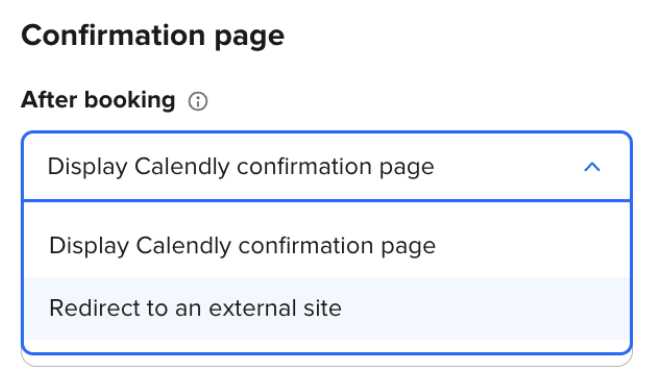
  3. In the initial event type’s settings page under “Booking page options”, set your confirmation page to “Redirect to an external site” and paste the link of the first secondary event type you wish to redirect your invitees to.
    nDVpK_E8GuwIpjKvqMb-De5rkkFkSUCgXpdBwAhRtEtqTVy5J-ZiwIKu2EMPBUrQTrO_7d1HUjeB26nrwo1xRm_KpyO7bCPG02H-FGash205Fe7Om8cxJq4VZdai9rhowWi-G6EGxKRVGB9G_nSsHTU


Love this workaround? Have questions about other possible workarounds? Let us know in the comments below!


This topic has been closed for replies.

15 replies

New Community Member
January 22, 2024

That is a great workaround BUT say I have several people booking different packages with 3 more follow up meetings.  They will all have the same “secret link” which is okay, BUT can it be used in the future after all their 3 follow ups have been used.  I run a business where people make appointments but I want to offer some packages so they have the opportunity to book more than 1 at a reduced rate.  

I am even considering moving to Acuity in order to do this.  But maybe there is a way with Calendly that I have missed.


Kelsi
CalPal Emeritus
January 22, 2024

Hey there @Tracey11138 - yes! A secret event type link can be used as often and for as long as you’d like it to be used! This link is just like any other link, aside from the fact that it cannot be found without you sharing it. I hope this helps!

Kelsi - Calendly Community
New Community Member
January 30, 2024

This is a great idea!

But what happens if they are group sessions and one client is booking their 1st session and the others are booking their 2nd or 3rd?

I'm guessing there will be conflicts? everyone has to be on the same number of sessions to book the same schedule right? or is there solution to this? 

New Community Member
February 21, 2024

Hey there @Tracey11138 - yes! A secret event type link can be used as often and for as long as you’d like it to be used! This link is just like any other link, aside from the fact that it cannot be found without you sharing it. I hope this helps!

Is there any plans to address this? The work around is fine, but the static link really lets it down as a vulnerability. 

Kelsi
CalPal Emeritus
February 21, 2024

Hey there @Tracey11138 - yes! A secret event type link can be used as often and for as long as you’d like it to be used! This link is just like any other link, aside from the fact that it cannot be found without you sharing it. I hope this helps!

Is there any plans to address this? The work around is fine, but the static link really lets it down as a vulnerability. 

Hey - thanks for your comment! At this time I cannot make any promises about if or when this might be updated, while I do appreciate that it would be a great update to be made! I can promise that we are passing along your feedback to our product team, whom is always taking into consideration user feedback like yours when improving Calendly. Have a great day! 

Kelsi - Calendly Community
New Community Member
April 6, 2024

Struggling with this myself! 

Just to confirm I would need to make three separate calendars with the different packages available for my clients to choose from ? 

This cannot be integrated into the ONE calendar ? 

Thanks for your help! 


New Community Member
April 6, 2024

I think this would be the best option ? 

Sharing a link that shows clients the different event types .. Sharing your scheduling link – Help Center (calendly.com) 

Is that correct? Or is there a way to show ONE Calandra on my page that has the different event types. 


Thanks again. 

Gabby 

Kelsi
CalPal Emeritus
April 8, 2024

Struggling with this myself! 

Just to confirm I would need to make three separate calendars with the different packages available for my clients to choose from ? 

This cannot be integrated into the ONE calendar ? 

Thanks for your help! 


I think this would be the best option ? 

Sharing a link that shows clients the different event types .. Sharing your scheduling link – Help Center (calendly.com) 

Is that correct? Or is there a way to show ONE Calandra on my page that has the different event types. 


Thanks again. 

Gabby 

Hey Gabby! Sorry for the delay - but I’m here to help! 

Firstly - yes. You’ll need to create three event types for your invitees to choose from with different prices, if that is what you are referring to. However, you can still set it up so that they only have to click one link in order to book using a routing form!

Routing forms let you request information such as industry, company size, specific interests, etc. from website visitors and automatically direct them to a specific scheduling or web page based on their responses. It's great for screening and qualifying sales leads on a website or matching clients or students to the booking page of the right subject-matter expert based on their interests, program, or other criteria. You can read more about setting up routing forms, here!

Your workflow would look like this: 

  1. Create an event type for each price you are offering 
  2. Create a routing form
  3. On the routing form, use the questions in order to find out the info needed to send the invitee to the correct event type (i.e. “What are you looking to spend?” with options being your different price points, or, “How many lessons are you hoping to book?” with options being a number based on a price point you created an event type for)
  4. Set up the routing to direct invitees to the correct event type
  5. Share the link for the routing form to allow bookings instead of sharing links to different event types

I hope this helps!

You can read more here: 

This article also offers tips and tricks for this use case: 


Kelsi - Calendly Community
New Community Member
April 9, 2024

SO helpful! 

Thank you :) 

Kelsi
CalPal Emeritus
April 9, 2024

SO helpful! 

Thank you :) 

Yay! You’re totally welcome - I hope you have no issues implementing this, but don’t hesitate to let us know if you need help! 

p.s. I do suggest peeking at our New User Guide and our Company Admin Guide while you learn the ropes and set up your routing etc. They’re both very helpful and totally packed with tips + tricks to get started! Have fun! 

Kelsi - Calendly Community