I am new to Calendly and my first attempts have not been successful. As a children's coach, I would like to offer two types of events on this platform: - 20-minute “discovery” calls for parents - One-hour individual coaching sessions for children. These would take place on different dates and times.
The goal would be to integrate the link directly into my website. Is it possible to offer both on the same schedule? If so, how do I do that?
Hi @Michèle04780, you can create many types of meetings on the same schedule. In Calendly you create schedules and event types freely from each other. You can apply as many event types to each schedule as you like.
There are a few ways schedules get applied to your event type. When you first set up your account you set up your basic working hours. This is your basic work schedule which all your event types will default to unless otherwise defined. Beyond that there are two ways to create specific schedules.
You can create a new schedule under Availability ← there you can set up as many schedules as you like.
Once they are created you can apply them to whichever meetings you like. To do this click on the meeting you want to work with. On the right rail of your browser screen a menu will pop out. Underneath Duration and Location you will see Availability options. Here is where your schedules appear. You can apply the pre-set schedules you already created or create a custom schedule specifically for that event type [see below].
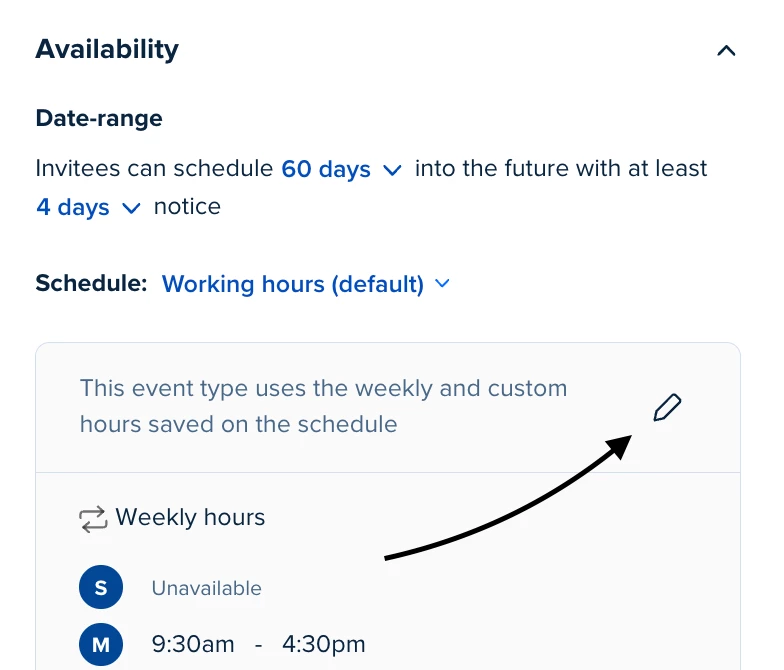
You can create a custom schedule for each event type. In the Availability section on the right rail editor associated with each event type you can set custom schedules for your meetings. To do so click the little pencil above your current schedule and set the times to whatever works best for you.
Hi @Michèle04780, you can create many types of meetings on the same schedule. In Calendly you create schedules and event types freely from each other. You can apply as many event types to each schedule as you like.
There are a few ways schedules get applied to your event type. When you first set up your account you set up your basic working hours. This is your basic work schedule which all your event types will default to unless otherwise defined. Beyond that there are two ways to create specific schedules.
You can create a new schedule under Availability ← there you can set up as many schedules as you like.
Once they are created you can apply them to whichever meetings you like. To do this click on the meeting you want to work with. On the right rail of your browser screen a menu will pop out. Underneath Duration and Location you will see Availability options. Here is where your schedules appear. You can apply the pre-set schedules you already created or create a custom schedule specifically for that event type [see below].
You can create a custom schedule for each event type. In the Availability section on the right rail editor associated with each event type you can set custom schedules for your meetings. To do so click the little pencil above your current schedule and set the times to whatever works best for you.