



hilaryyeg
Employee
Employee
September 5, 2025

🎉 It’s here: Introducing coupon codes!
  • September 5, 2025
  • 34 replies
  • 4415 views

Hey Calendly Community 👋

I’m so excited to share that coupon codes are officially available in Calendly!

With coupon codes, you can now create and manage flexible discount codes for your Stripe-powered paid events, directly from Calendly. Coupon codes are unique to each event type, and fully customizable. 


✨ How to create your first code:

  1. Select the event type where you want to offer a discount.
  2. In the editor, click More options, then scroll to Payment.
    Make sure you're connected to Stripe and have a price set.
    (Need help? Here’s how to connect Stripe and set your price)
  3. Click Create coupon code to open the setup window.
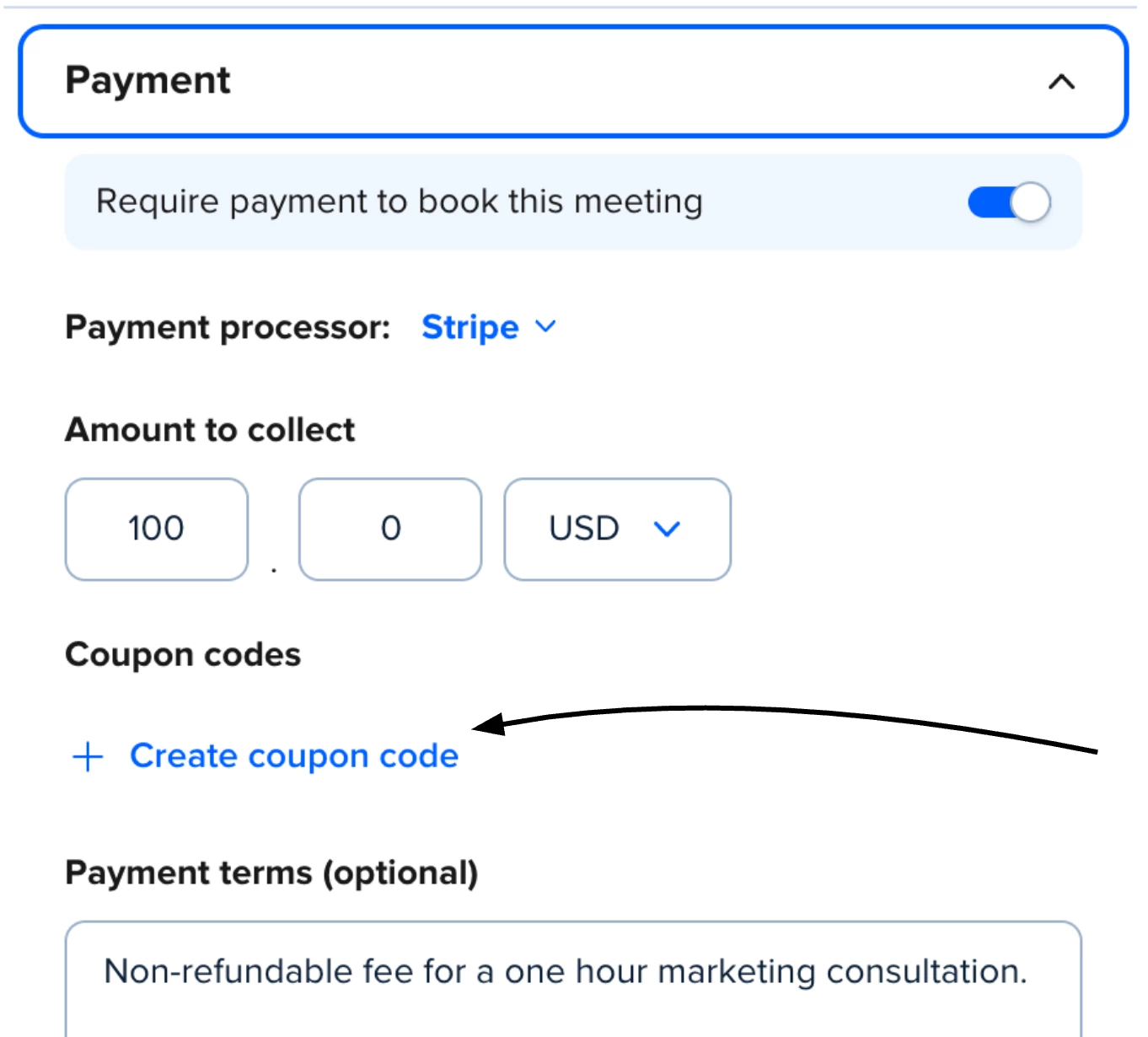


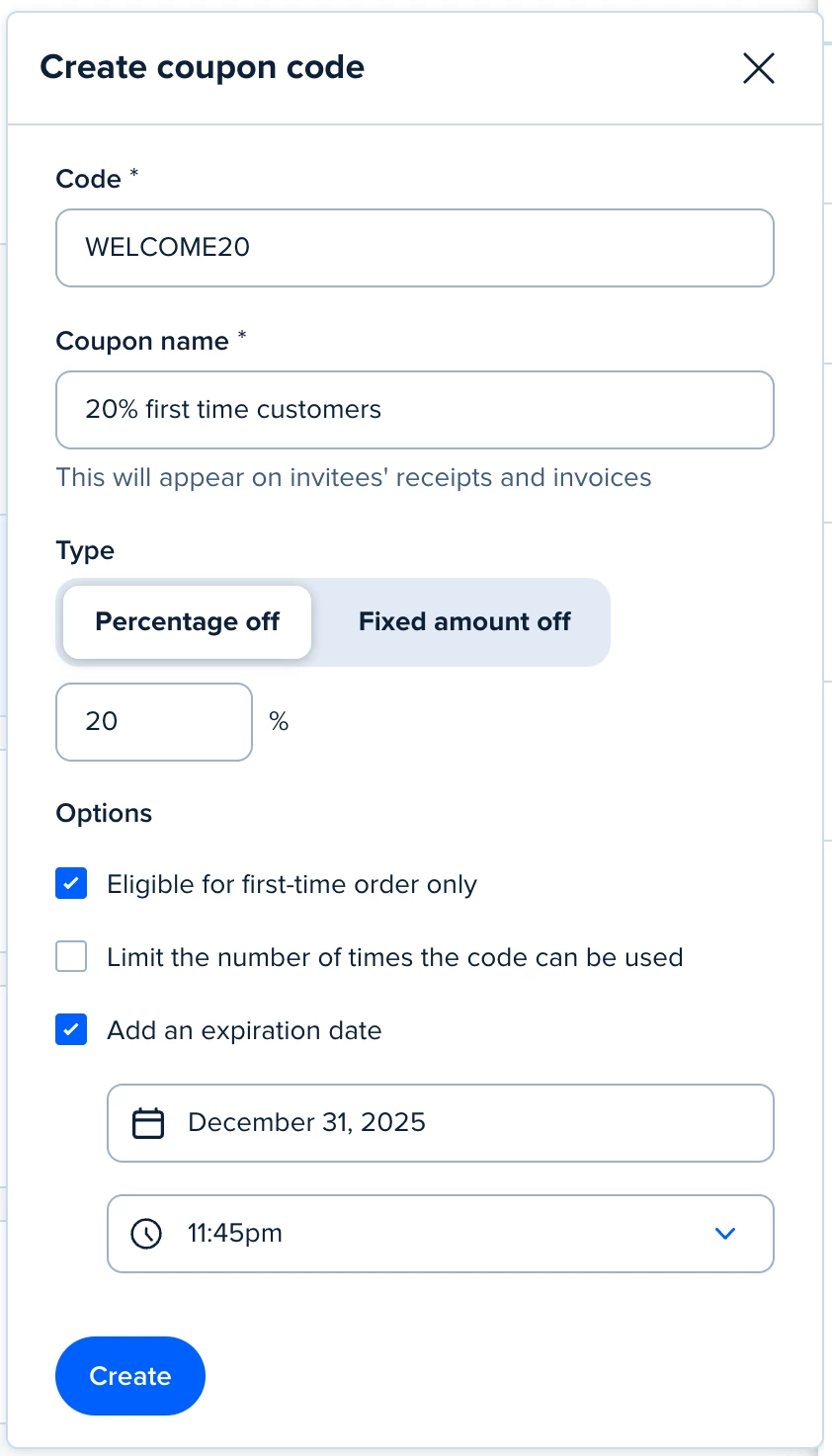
There, you’ll:

  • Add a unique coupon code (what your clients enter at booking)
  • Include a coupon name (what appears on receipts and invoices)
  • Choose between a percentage or flat-rate discount
  • (Optional) Limit the code to first-time bookings, set usage limits, and add an expiration date


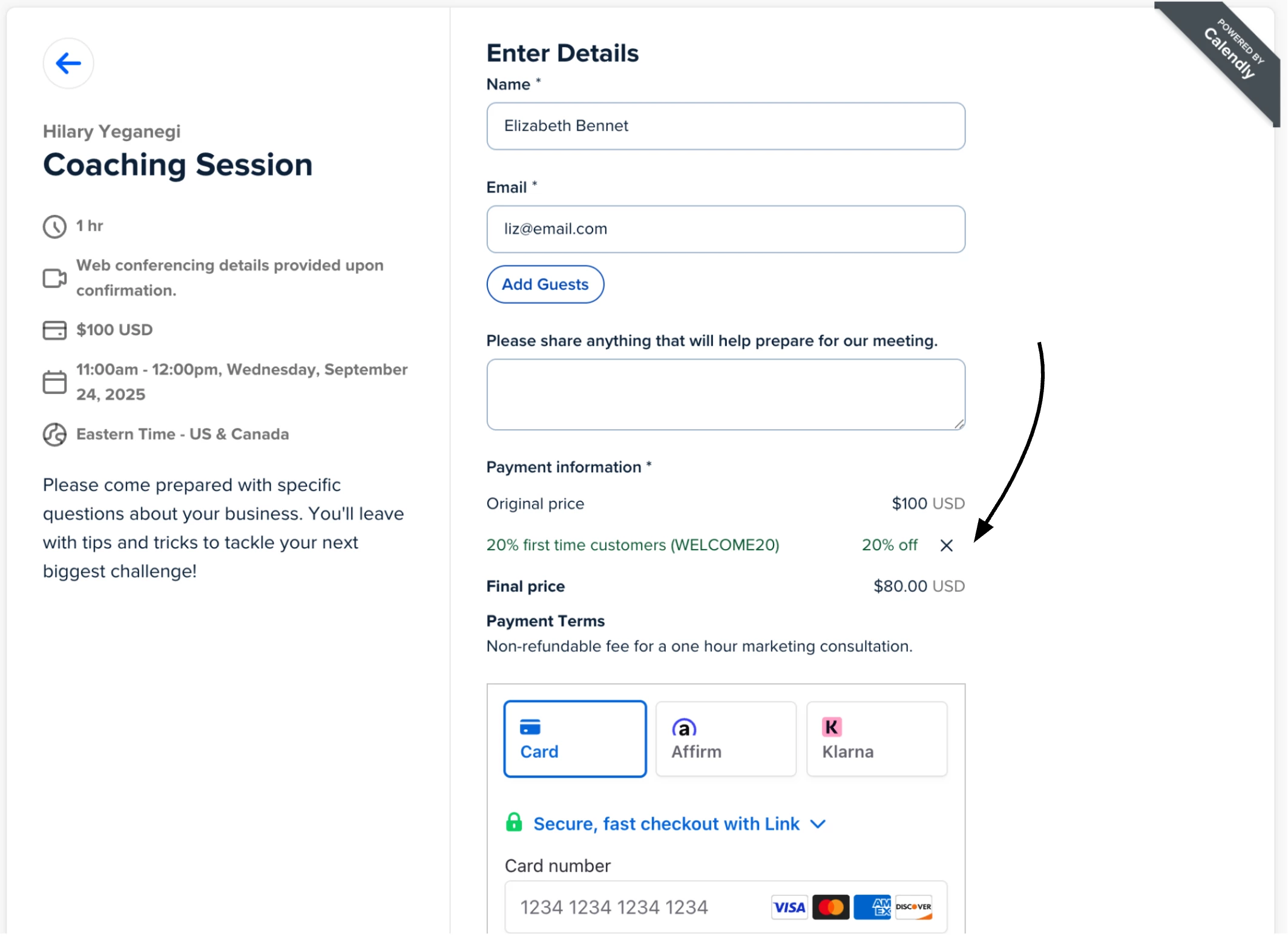
Once your code is created and saved, your customers can easily enter the code at checkout, see the adjusted price, pay and schedule in one smooth step.


🚀 Why use coupon codes?

By offering coupon codes for your paid events with Calendly, you make it easier to grow your business and build relationships with your clients:

  • 🎯 Attract new customers with first-time booking offers
  • 💙 Reward loyal clients with special discounts or VIP pricing
  • 🗓️ Run seasonal promotions or limited-time campaigns
     

Whether you're a solopreneur, coach, consultant, or small business owner, we can’t wait to see how you use coupon codes to power your growth. Have questions? Drop them below — and let us know how you're planning to use this new feature!


Visit the Help Center for more information on coupon codes with Stripe.


FAQ


Q. Can I use this with the PayPal Integration? 
A. This is only available with the Stripe Integration at this time.

Q.  Can I make a paid event free with a coupon code?
A. Yes, you can create a coupon code that give invitees a 100% discount, making a meeting free. If the coupon covers the full price, your invitee will skip the Stripe checkout process and no transaction will appear in Stripe.


Q. Can coupon codes be used for multiple event types?
A. No, coupon codes are specific to each event type. You can’t currently use the same code on more than one ET.

    34 replies

    New Community Member
    September 8, 2025

    Hello 🤗,

    Thank you for this great feature that will surely help a lot with the marketing process.

    Do you know if it will be integrated for paypal payments as well ?

    If it is planned, do you know an estimate of how long long it will take to be available ?


    Thanks in advance for you reply.

    Regards,

    New Community Member
    September 9, 2025

    When will this feature be available? 

    hilaryyeg
    Employee
    hilaryyegAuthor
    Employee
    September 9, 2025

    Hi ​@Mélanie18300, this is not planned right now but it is on our radar and I will pass your interest over to our product team for this.

    @Charlotte03851, this is gradually rolling out now. We anticipate that everyone should have this feature available by end of next week, but continue to check your account for availability. 

    Hilary - Product and Partner Marketing @ Calendly
    New Community Member
    September 9, 2025

    Thanks for the update, Hilary! Appreciate the clarity on what’s coming and the timeline for rollout. 🙌

    Daring Futures
    Community Member
    September 12, 2025

    Not seeing it yet.  

    Still excited though. 🥳

    New Community Member
    September 15, 2025

    For limiting code use is that per person or for the use of the code for all users? 

    can we create codes dynamically using the API? Or is it only a single code per event?

    hilaryyeg
    Employee
    hilaryyegAuthor
    Employee
    September 17, 2025

    @Daring Futures You should have access tomorrow at the latest. Thanks for your patience as we get this rolled out!

    @thereppedlab good questions. The “Limit the number of times the code can be used” option is across all your users, so if you limit a code to 5 times, and share with 5 people, they could each book once or one person could in theory book all 5. If you want to make sure different users are redeeming, you can check the “Eligible for first-time order only” option to make sure unique people are using this code. 

    There is not currently a way to create codes dynamically, but I passed that question along to our team. You can however create more than one code per event type, and share those with different customers as needed.

    Hilary - Product and Partner Marketing @ Calendly
    New Community Member
    September 18, 2025

    Hi ​@hilaryyeg  This doesn't actually show (as far I can see) WHERE the client/customer needs to input the coupon - it just shows the coupon discount being applied to the price. Can you share a picture of the place where they input/apply the code? Thank you

    Daring Futures
    Community Member
    September 18, 2025

    Thanks ​@hilaryyeg - I can see it now!

    🥳

    hilaryyeg
    Employee
    hilaryyegAuthor
    Employee
    September 18, 2025

    @Natalie62755 I see what you’re saying now. Here’s a view of the input field: 


    Hilary - Product and Partner Marketing @ Calendly