Question

Inline Embed Background Color Suddenly Changing Text to Dark Navy (Was White Before)

  • April 19, 2026
  • 10 replies
  • 69 views

  • Community Member

Hi everyone,

I’m having an issue with the Calendly Inline Embed on my website. I set a custom background color using the options from the Calendly documentation, and originally all the text including the date picker text displayed in white, exactly as expected.

However, this week something changed without me updating anything. Now the date picker text (and some other text elements) suddenly appear in a dark navy blue color, which makes them almost unreadable against my background. The embed settings haven’t changed on my side, so I’m wondering if something was updated on Calendly’s end.

I’m attaching a screenshot so you can see what I mean.

Has anyone else experienced this recently? Is this a known issue or is there a workaround to force the text color back to white?

Thanks in advance for any help or insights.
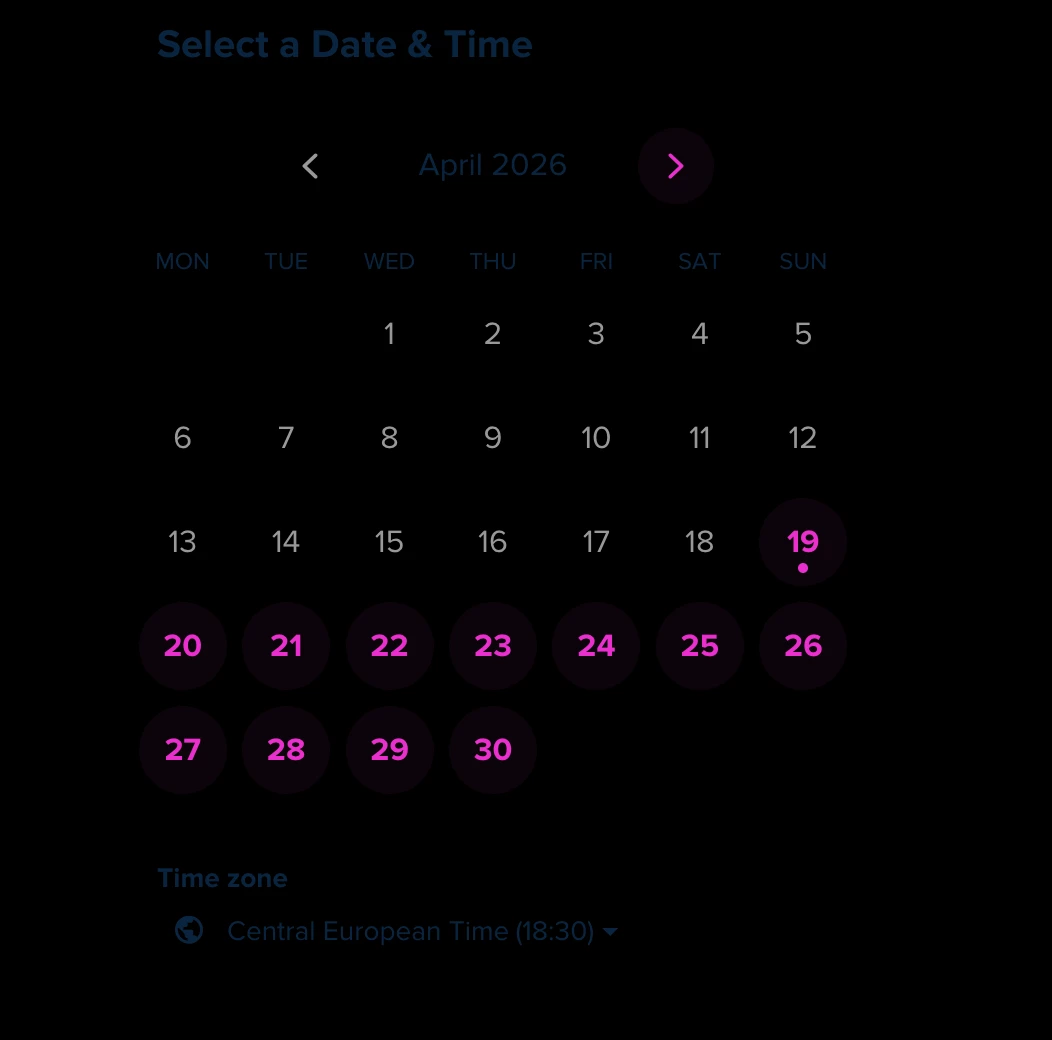


10 replies

  • New Community Member
  • April 20, 2026

We’re experiencing the same.

Seems it may be a bug that started in the last 4 days. Not sure why or if it’s on Calendly’s radar to fix.


David
Community Manager
  • Community Manager
  • April 20, 2026

Hi all!

Thanks for reaching out on this. We haven’t seen anything widespread on this yet, but we appreciate you raising this. Would you both be able to try changing the colors back to what they were originally? You should be able to make this change through the embed code here: (This is just an example, please adjust it to your liking)

<!-- Calendly inline widget begin -->
<div class="calendly-inline-widget" data-url="https://calendly.com/?background_color=840808&text_color=f5f5f5&primary_color=000000" style="min-width:320px;height:700px;"></div>
<script type="text/javascript" src="https://assets.calendly.com/assets/external/widget.js" async></script>
<!-- Calendly inline widget end →


Let me know if switching it back through the embed code works.


  • New Community Member
  • April 20, 2026

I have the same issue. The original colours work but my customised colours dont


  • New Community Member
  • April 20, 2026

Yes...I am having the same issue.  Description text is blue and not changing at all.  Had to change my background color in order to see it.


  • New Community Member
  • April 20, 2026

Same issue here - Blue text defaulted as the “primary”.

Also not displaying the logo it’s just blended into the background colour


David
Community Manager
  • Community Manager
  • April 20, 2026

Hi all! 

Our engineering team is aware of whats going on and is working on it! Please continue to add a reply if you’re experiencing this with your embed.


Thank you!


  • New Community Member
  • April 20, 2026

Same issue here - and I only just joined the community to report this! I have a dark background and the primary and text colour in the embed code are set to a light yellow. However, since today the text is suddenly navy blue and hardly readable. Please fix this as soon as possible!!! Thank you!


  • Author
  • Community Member
  • April 20, 2026

There's no issue with the original widget colors. The problem only appears when I set the widget background to black and the text color to white. In that case, some text elements correctly switch to white, but others stay in the default navy blue. It looks like certain UI elements are being forced to keep the default color, possibly due to a hard‑coded class or style override in the Calendly UI. This behavior is new everything was working perfectly about a week ago so it may be related to a recent update.


  • New Community Member
  • April 21, 2026

I have the exactly the same problem starting today. Navy Blue text appears instead of the color specified as a parameter for the widget with custom background color. Does engineering team have an ETA when the fix will be released?


  • New Community Member
  • April 21, 2026

When will it be fixed? My customers cannot book my timeslots that way and I am losing money!